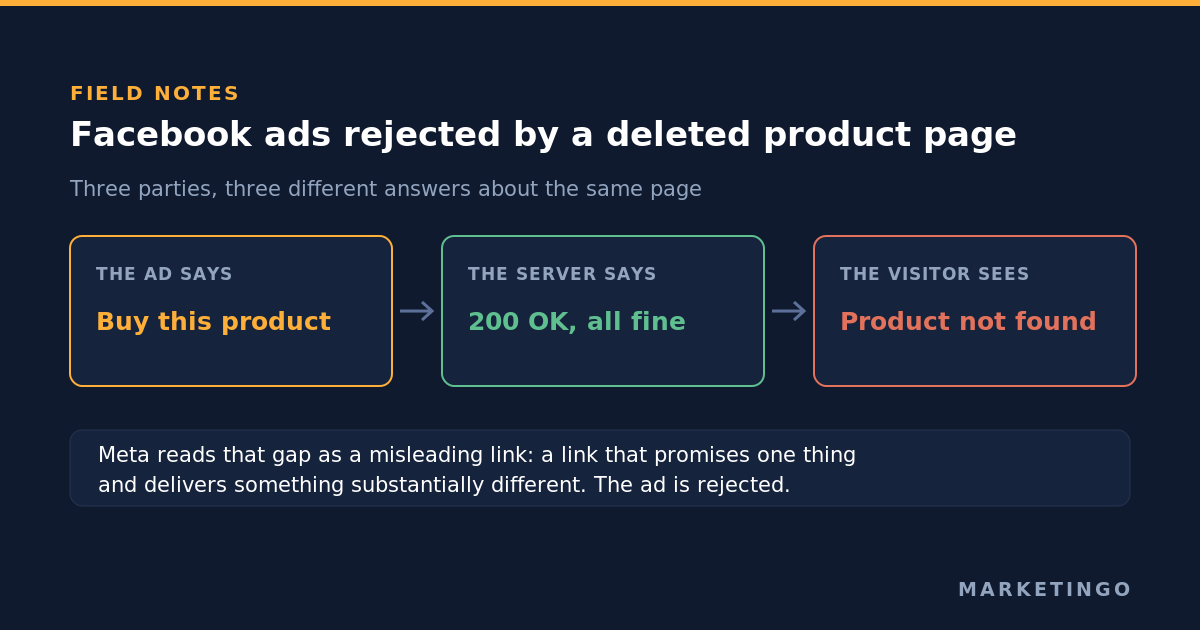
An account we manage, a United Kingdom marketplace selling refurbished consumer electronics, had been losing ads to rejections since June. Catalogue ads went down, then retargeting ads, then user generated content ads, on different days, with policy notices that named nothing you could act on. Every rebuilt creative was rejected too.
The cause was not in the ads. It was on the client's own website, in what a deleted product page said when something asked for it. This is the diagnostic order we now run whenever Facebook ads keep getting rejected with no clear reason, and it starts a long way from the ad.
Meta reviews the destination, not only the creative
Most advice about rejected ads treats the ad as the whole surface area. It is not. Meta's Advertising Standards describe the scope: "This review process may include the specific components of an ad, such as images, video, text and targeting information, as well as an ad's associated landing page or other destinations, among other information" (Meta, Introduction to the Advertising Standards). The same document carries a relevance rule that matters more for online stores than almost anything else in the policies: "The products and services promoted in an ad must match those promoted on the landing page."
The commerce documentation says it again for catalogue ads. A catalogue item's link field is "The URL to the specific product page for the item on your business's website where people can learn more about or buy that exact item", and "Links must begin with http:// or https://, be valid and be hosted on your business's website domain" (Meta, Catalog fields reference). "Be valid" is the clause that quietly fails.
The bug: the page said not found, the server said everything is fine
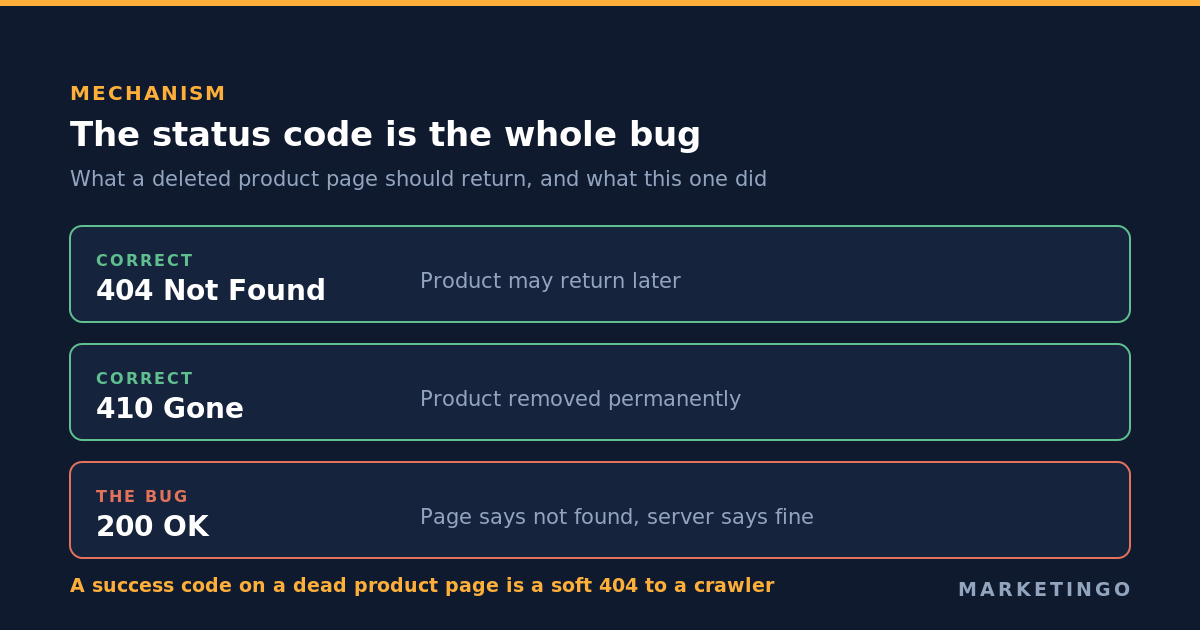
When this client's platform deleted a product, the page it served told a human visitor the product was gone. What it told a machine was different. It returned the status code 200, which is the code a web server sends to say the request succeeded and here is the page.
Both correct answers were available and unused. The specification defining these codes says 404 "indicates that the origin server did not find a current representation for the target resource", and 410 "indicates that access to the target resource is no longer available at the origin server and that this condition is likely to be permanent" (RFC 9110). A product that might come back is a 404. One that is gone for good is a 410. What it must not be is a 200.
Search engines have a name for the mistake. Google's crawling documentation notes that when a page returns a success code but "the content suggests an error for Google Search, an empty page or an error message, Search Console will show a soft 404 error" (Google Search Central).
For a search crawler, a soft 404 is an indexing nuisance. For an ad review system it reads as something worse. Meta's spam policy defines "Misleading Links: Content containing a link that promises one type of content but delivers something substantially different." It also defines cloaking as "any attempt to circumvent our content policies by intentionally presenting different off-platform content, such as URLs or applications, to our integrity systems versus what is shown to users" (Meta, Spam).
Nobody at the client intended any of this, and the word "intentionally" in that definition does not describe what happened. But enforcement does not read intent off a web server. The observable shape is identical either way: the ad promises a specific product, the server reports a working page, the visitor arrives at a dead end.
Why it compounded instead of staying flat
A single bad link would be a single rejected ad. Three things turned it into a wave that got worse month over month.
Ads are re-reviewed after they are approved. The standards are explicit: "Ads remain subject to review and re-review at all times, and may be rejected or restricted for violation of our policies at any time." An ad that passed in May is not settled. When the review system came back to it in July and followed the link, the link was now pointing at a product that had since been deleted.
A catalogue re-crawls itself. The account had legacy items still marked as available while pointing at pages that no longer existed. The availability field accepts only "in stock, out of stock", and items sitting at in stock stay eligible to serve, so every refresh of the catalogue walked the same dead addresses again. Each pass was a fresh trigger rather than a repeat of an old one.
Enforcement climbs from the ad to the account. "If a violation is found at any point in the review process, the ad will be rejected, and the Business Account or its assets may be restricted." The standards also say that beyond individual ads, Meta will "monitor and investigate advertiser behavior, and may restrict advertiser accounts that don't follow our Advertising Standards", and the spam policy adds that restrictions may be placed on accounts where other indicators are present.
Read those three together and the pattern makes sense. Each rejection looked local, as though one creative had crossed a line. What was actually accumulating was a record against the domain, built from hundreds of small confirmations of the same fault.
The theory we had to kill first
There was a more plausible explanation on the table before we got to any of this, and it was wrong.
About 78% of the products in this catalogue use images hotlinked from suppliers rather than photographed in house, and the theory was that Meta was flagging supplier and competitor stock imagery. It is the kind of explanation that feels right because images are the part of an ad you can look at.
It died on one count. The same product had three ads running live and one rejected, on the identical image. If the image were the trigger, all four would have gone down together. That check took two minutes and saved a month of reshooting product photography. A rejection wave attracts explanations, the ones about creative are the easiest to believe, and the way through is to find the smallest fact that would disprove the favourite theory before acting on it.
What the review system can see, and why the notice says so little
Two facts about the review explain most of the frustration around a rejected ad.
The first is that it is mostly machine work. Meta states that "our ad review system relies primarily on automated tools to check ads and business assets against our policies", and that "we use automated and, in some instances, manual review to enforce our policies." A pattern matcher can tell you that something in the submission resembled a violation. It cannot tell you which part, and the notice you receive reflects that.
The second is that the whole submission is in scope, not the part you are looking at. Images, video, text, targeting information and the destination are all reviewed together. An advertiser rewriting ad copy in search of the problem is searching a fraction of the surface area, which is how a team can produce five versions of the same creative and watch all five rejected.
Two further clauses matter before you escalate. Meta reserves the right "to reject, approve or remove any ad for any reason, in our sole discretion", so there is no entitlement to a stated reason. And in the restricted categories the route to get ads approved is permission rather than rewriting: "For policies that require prior written permission, Meta may grant these permissions." Separately, rejection and throttling get confused: "Lower quality ads which do not necessarily violate our policies may experience impacted performance", so a campaign that quietly stopped spending has not necessarily been rejected at all.
The ordinary causes, to rule out first
Most rejections genuinely are about something inside the ad, and these are cheaper to check than a web server:
- Restricted categories. Alcohol, financial products and cryptocurrency, dating, gambling, health and supplements, and political or social issue content carry extra requirements, permissions or country restrictions.
- Unrealistic claims. Promises about results, earnings or outcomes the advertiser cannot support.
- Personal attributes. Copy that implies knowledge of the reader's health, finances, race, religion or other protected characteristic, including second person phrasing that assumes it.
- Special ad categories. Housing, employment and credit ads must be declared and run with the restricted targeting options.
- Creative construction. Image text, buttons drawn into an image, and trademarks or brand assets used without permission.
Two things separate that list from the case described here. Those rejections usually name a category in the notice, and they land on one ad rather than across three ad types at once. If the notices are vague and the pattern crosses catalogue ads, retargeting and ordinary creative at the same time, the shared thing between them is rarely the creative. It is the account, the page, or the website they all point at.
The diagnostic, in order
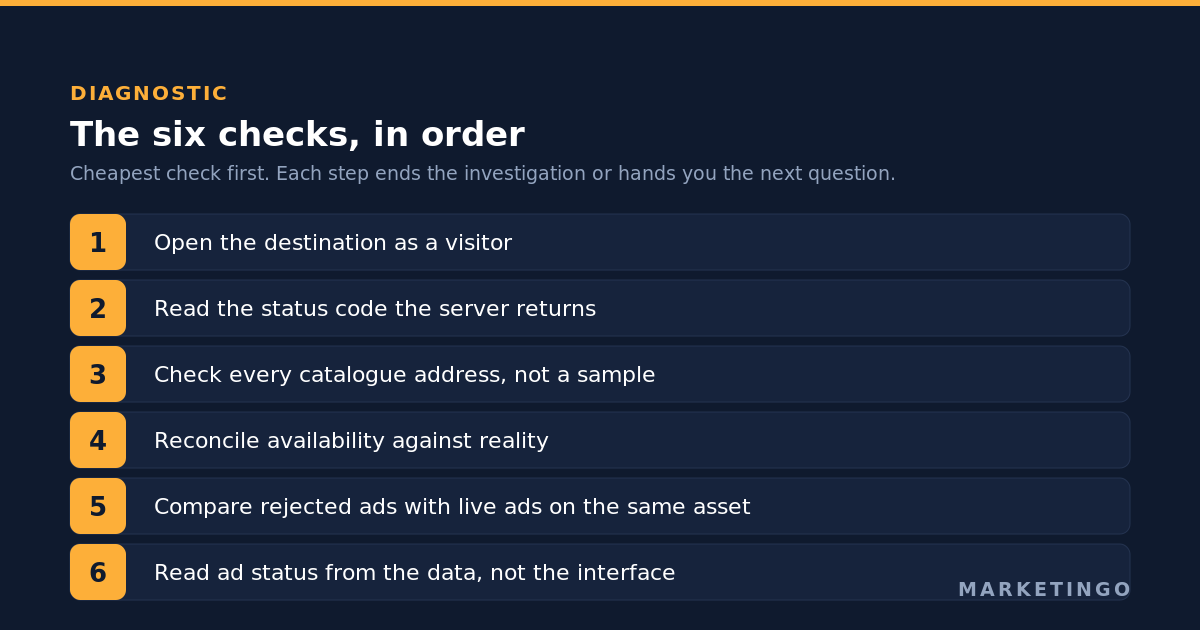
Six checks, cheapest first. Each one either ends the investigation or hands you the next question, and together they are how we get a Facebook ad rejected without explanation back into delivery.
1. Open the destination as a visitor. Copy one rejected ad's destination web address, open it in a private window, and read what a stranger sees. Half of these investigations end here, at a page that is empty, broken, or about a different product than the ad.
2. Ask the server what it thinks. Then request the same address from the command line and read only the status code:
curl -sS -o /dev/null -w "%{http_code}\n" https://example.com/products/deleted-item
A page that shows a not-found message to you and answers 200 to that command is the bug described here. The fix belongs on the website: return 404 for a product that may return, and 410 for one that is gone permanently.
3. Check every address, not a sample. Export the catalogue, pull the link column and request all of them. Sampling finds this only by luck, because the dead addresses are the long tail of discontinued products rather than the bestsellers you would check by hand.
4. Reconcile availability against reality. Items marked in stock that point at deleted pages are the worst case in the set, because availability is what keeps them eligible to serve. Those are the ones generating fresh triggers while you investigate.
5. Compare rejected ads against live ads on the same asset. If the identical image, video or copy is running live somewhere else in the account, that asset is not the trigger. This is the two minute test that kills creative theories.
6. Read ad status from the data, not from the interface. An ad can show an approved tick in a dashboard while the delivery record says otherwise, so we read status through the application programming interface instead. An investigation built on a stale status column chases ads that are already fine and misses ones that are not.
One interface trap silently shrinks appeals. In Business Support Home the select all control ticks only the first row of results, and a "Show all" banner hides the rest. An appeal you believe covers forty rejected ads can cover one. Count what you submitted against what you meant to submit.
Appeal while you fix, not after
The site fix and the reinstatement run on separate clocks. Fixing the status codes stops new triggers, but it does not bring back the ads already down. For that you appeal.
In this account we appealed twice and Meta reversed both decisions. One ad was killed on a Sunday while running at a return on ad spend of 25, and it was approved again by 09:23 the next morning. For an ad set carrying that kind of efficiency, the weekend offline was the expensive part of the whole episode, which is the argument for appealing the same day rather than waiting for the website change to ship.
Meta documents the route plainly: "If you believe the ad, ad account, user account, Page or Business Account was incorrectly rejected or restricted, you can request a review of the decision in Account Quality", and ad review "is typically completed within 24 hours, although it may take longer in some cases."
What we would not do again is rebuild the creative. Meta treats an edited or recreated ad as a new ad in the review queue, so a rebuild discards whatever delivery history the original had, and if the trigger is still on your website the replacement goes down too. That is how a rejection problem becomes a performance problem: the account keeps restarting the ads that were working.
When this does not apply
You run a handful of ads to two or three pages. The bulk address check is overkill. Open each page, check each status code, and you are done in ten minutes.
The rejection notice names a specific policy. Read the notice and fix what it names. The method here is for vague notices and a pattern that crosses ad types.
You cannot change what a deleted product returns. On some hosted stores the status code is not yours to set, so the lever is the catalogue instead: remove discontinued items from the feed rather than leaving them pointing at an address that answers incorrectly.
The restriction is at account level with no ad pattern underneath it. A business account restricted with no trail of ad rejections is usually about billing, identity or business verification, and the diagnostic above will find nothing.
Check the destination before you touch the creative
The lesson is narrow and cheap to apply. When ads are rejected in a pattern rather than one at a time, the shared cause is in what they point at, and the cheapest first move is to ask the server what it says about the page rather than asking a designer to change the image.
That habit is part of how we run Meta Ads management, and it is the same reflex behind auditing a platform representative's recommendations against the account data rather than applying them. The cost of a rejection wave is only readable off your own margin, which is what our ecommerce return on ad spend calculator is for, and what break-even return on ad spend and what Facebook ads cost cover in full.
Most of our work in ecommerce and direct to consumer looks like this: unglamorous diagnosis first, then scale. In our consumer electronics case study that sequence took return on ad spend from 3.2 to 11.2 for a United Kingdom brand over four months on Meta Ads.
If ads in your account are being rejected now and nobody can tell you why, a free ad audit is a read only pass over the account where we check what your ads point at, what your catalogue claims is available, and what your conversion tracking is actually recording. No obligation, and you keep the findings either way.