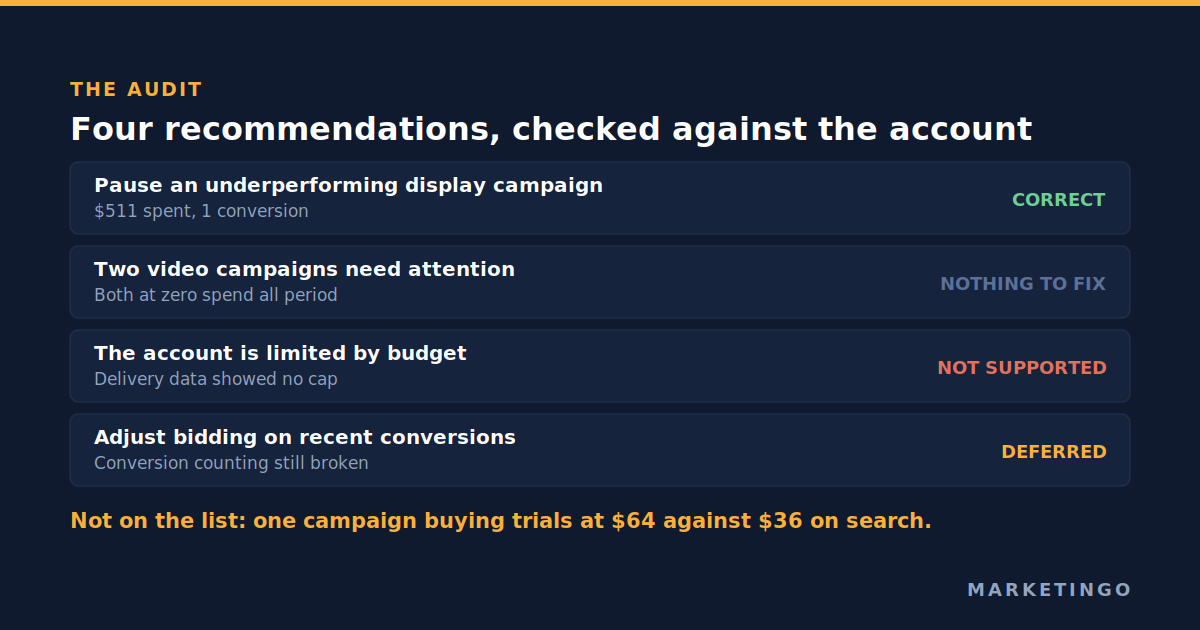
A client of ours, a business to business software company whose product strips sensitive information out of documents, forwarded an email from her Google account representative one afternoon in August. It listed four things she should change. She asked a fair question: should we do these?
We read every one of them against the account data the same evening. One was right and we applied it. Two described activity that was not happening. One made a claim about budget that the delivery data did not support. And the most expensive thing happening in the account that month was not on the list at all.
This is not a story about a bad representative. It is about what a recommendation engine can see and what it cannot, and about a ten minute habit that turns an inbox full of suggestions into three or four decisions you can defend.
What optimization score actually measures
Start with the number above the recommendations, because most people read it as a performance grade and it is not one.
Google's documentation defines optimization score as "an estimate of how well your Google Ads account is set to perform", running from 0 to 100%, where 100% means "your account can perform at its full potential". The important sentence is the one about how it is produced. Google says the score is "calculated in real-time, based on the statistics, settings, and the status of your account and campaigns, the relevant impact of available recommendations, and recent recommendations history" (Google Ads Help, About optimization score).
Read that last input again. Recent recommendations history is part of the score. So the score rises when you engage with the recommendations queue, whether by applying suggestions or by dismissing them, and it falls when suggestions pile up unread. That is a measure of housekeeping. It is not a measure of profit, and the same page confirms the score is "not used by your Quality Score".
Google's own marketing page for the feature states that "advertisers that used Google recommendations to increase their account-level optimization score by 10 points saw a median 14% increase in conversions" (Google, Campaign recommendations). That claim carries no footnote, sample size or methodology on the page it appears on, and it describes a correlation between two things that both rise when somebody is actively working on an account.
The largest independent look at this is worth more than the claim. Optmyzr analysed 17,380 Google Ads accounts running at least 90 days and spending between $500 and $1 million a month. Accounts scoring 90 to 100 did beat accounts below 70 on return on ad spend by 186% and carried the cheapest cost per acquisition, but the authors concluded that optimization score "is not and should never be a KPI. It is a useful tool to focus work" (Optmyzr).
That is the honest reading. Well managed accounts tend to have high scores, because managing an account well involves clearing the queue. Raising the score does not make an account well managed, any more than clearing your inbox makes you right.
The recommendation types you will actually see
Google groups recommendations into categories, and knowing which category you are looking at answers most of the question before you open the account.
Bidding and budgets. Switch to a smart bidding strategy, raise a target, lift a budget that is said to be limiting delivery. These are the highest consequence recommendations in the queue, because a bid strategy change alters how every auction in that campaign is entered.
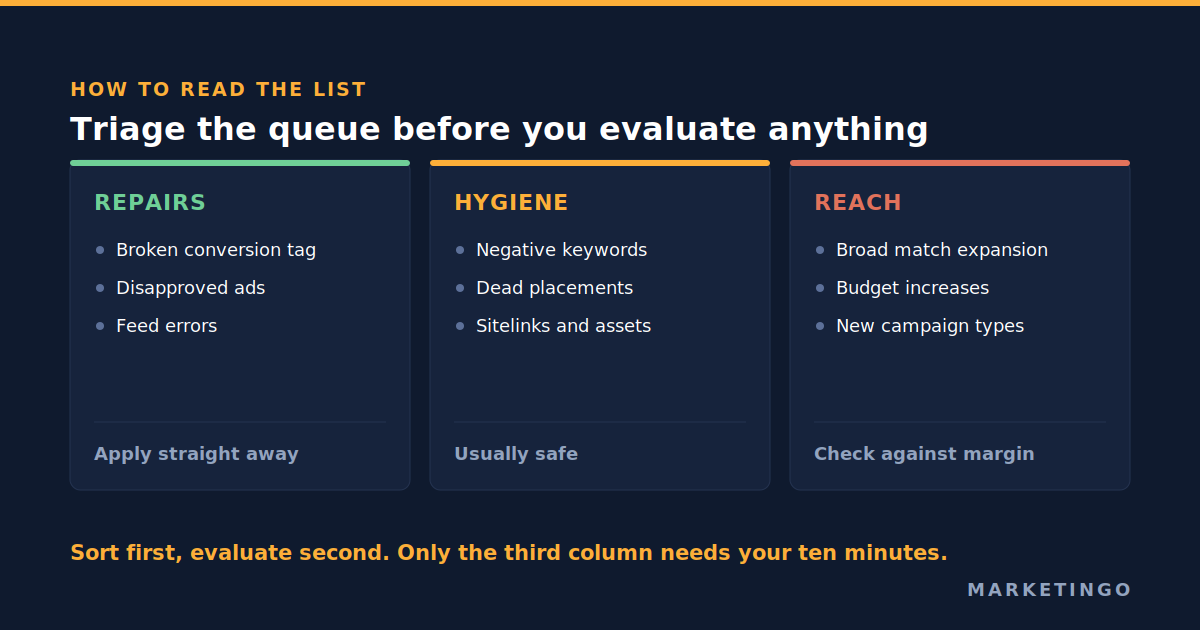
Keywords and targeting. Add keywords, add broad match, expand audiences, remove conflicting negative keywords. Mixed. Adding a negative keyword is hygiene. Adding broad match to a campaign that is working is a reach recommendation wearing a keyword recommendation's clothes.
Ads and assets. Add sitelinks, add images, improve ad strength, add responsive search ads. Usually cheap and usually worth applying, with one caution: ad strength is a measure of how closely an ad follows Google's construction guidance, not a measure of whether the ad sells.
Repairs. Fix disapproved ads, fix a broken conversion tag, fix a feed error. Apply these first, every time. They are the only category where the engine sees something genuinely broken that you may not have noticed.
A useful habit: sort the queue into repairs, hygiene and reach before you evaluate anything. Repairs go straight through. Hygiene is usually safe. Reach is where you spend your ten minutes.
The four recommendations, and what the account said
Here is what the list contained and what twenty minutes in the account returned. Figures are from that account in August.
| What the list said | What the account data showed | Verdict |
|---|---|---|
| Pause an underperforming display remarketing campaign | The campaign had spent $511 since late July and produced one conversion | Correct, applied the same evening |
| Two video campaigns needed attention | Both had been at zero spend for the whole period in question | Nothing to fix |
| The account was limited by budget | Delivery data did not show campaigns capped or losing impressions to budget | Not supported |
| Adjust bidding on the strength of recent conversion volume | Conversion counting in the account was still being repaired at the time, so recent volume was the wrong input | Deferred until tracking was clean |
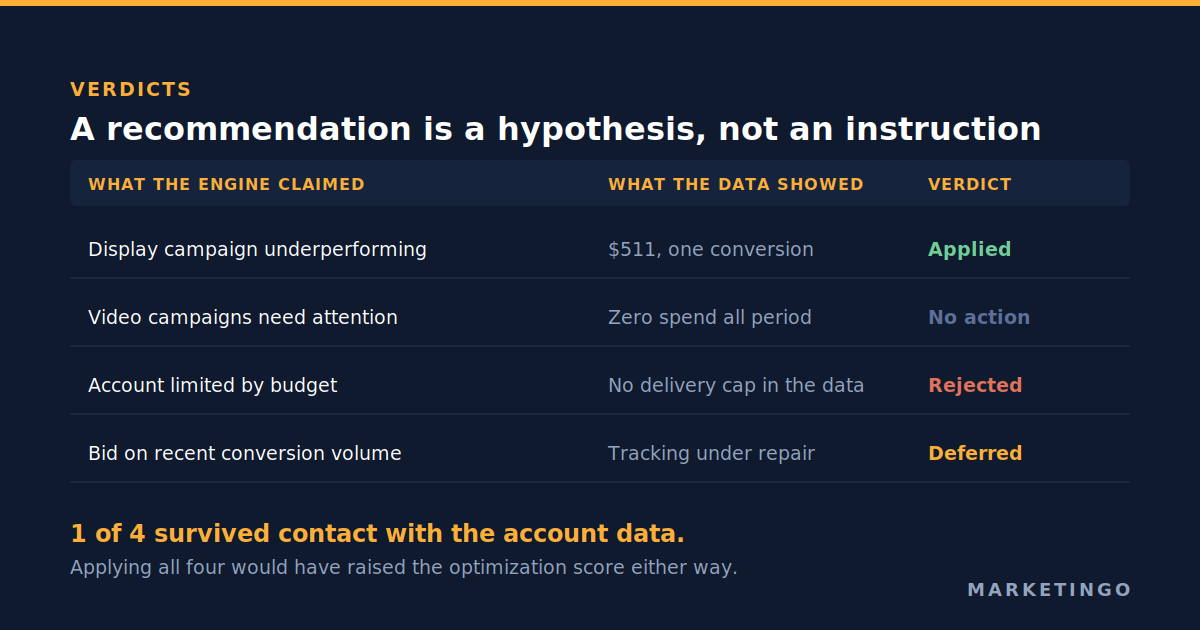
One in four is not an indictment. The recommendation that was right was worth catching, and $511 for one conversion is exactly the kind of quiet drain a busy advertiser misses. The point is that applying all four without checking would have meant making three changes to solve problems the account did not have, and every one of those changes would have raised the optimization score.
The most expensive problem was not on the list
While we were in there, we looked at what the list did not mention.
A Performance Max campaign had spent $255 since the start of that month and produced four trial signups, which works out at roughly $64 each. Search in the same account was producing trials at about $36. Inside that period sat a single weekend where the campaign served around 6,000 impressions and converted nobody.
Nothing in the recommendations queue flagged this, and that is not a failure of the engine so much as a description of what it is for. The recommendations system, in Google's words, "checks your account's performance history, your campaign settings, and trends across Google to automatically generate recommendations that could improve your performance" (Google Ads Help). It compares your account against patterns. It does not know your margin, it does not know that a trial from one campaign type converts to paid at a different rate than a trial from another, and it has no opinion about whether $64 is a good price for the thing you are buying. You do. That comparison is the whole job, and it is the one our Google Ads audit checklist is built around.
We have found stranger things by looking than by reading the queue. In another account in the same vertical, a client asked whether a remarketing campaign really had produced nothing all year. It had not, for a reason no recommendation would surface: the campaign was enabled, but all ten of its ad groups were paused. It had been dark for three and a half years, and its only real run had spent $2,427 for 313,000 impressions. The account showed a live campaign. The campaign was showing nothing to anybody.
In a high ticket business services account we took over, a long running complaint about lead quality turned out to be residue: more than 1,200 keywords left behind by automated campaign types switched off long before. Cost per lead had drifted from a range of $70 to $90 up to a range of $170 to $470. The engine had nothing to say about any of it, because from its point of view nothing was wrong.
The ten minute audit: how to read any recommendation against your own data
This is the repeatable part. It works for a representative's email, for the recommendations page, and for any suggestion from any advertising platform.
- Write down what the recommendation is claiming. Most contain a hidden factual claim: that a campaign is underperforming, that you are losing impressions to budget, that a bid strategy has enough conversion data to learn from. Separate the claim from the instruction.
- Find the column that would disprove the claim. Limited by budget is a status you can read per campaign. Underperforming is spend against conversions over a stated window. Enough conversion volume is a count. Each claim has one place in the interface that settles it.
- Pull the window the recommendation used, then a longer one. Suggestions are often generated from a short window where noise looks like a trend. If a claim holds over seven days and disappears over ninety, it is noise.
- Check the conversion actions before trusting any conversion number. If the account counts the wrong things, every recommendation built on conversion volume is built on sand, and this is the commonest reason to defer rather than reject. Our guide to Google Ads conversion tracking covers what to verify.
- Price the change against your own economics. What does it cost if it is wrong, and earn if it is right? A negative keyword is cheap to reverse. A bid strategy change on the campaign carrying most of your volume is not.
- Record the decision and the reason. Dismissing a recommendation tells the system you considered it. A one line note tells your future self why, which matters when the same suggestion returns in six weeks.
Steps one and two do most of the work, and together they usually take under ten minutes.
Three questions that settle most recommendations
When the queue is long, these three cut it down fast.
Does this increase reach, or increase efficiency? Broad match expansion, budget increases and new campaign types all grow spend. They can be right, but they are never free, and they always raise the optimization score.
Would this still be right if my margin were half what it is? The engine optimises to the conversion you named, at whatever price the auction charges, and cannot know whether that price leaves you anything. If you do not have a number for the most you can pay for a lead and still profit, build it first. Our lead generation return on investment calculator works back from contract value and close rate to that ceiling, and once you have it, half the queue answers itself.
Is the thing it describes actually happening? Two of the four recommendations above failed here, and it is the commonest failure mode. It costs one look at the account to check.
When a recommendation deserves a yes, and how to say it carefully
Plenty of recommendations are good. The display campaign burning money was flagged accurately and we would not have wanted to miss it.
There is also a middle answer better than yes or no, and we used it with the same client a month later. Their customer relationship management system was recording a marketing qualified lead action that had fired about 80 times in 90 days, and the question was whether to promote it to a primary conversion so that smart bidding would optimise toward it. The volume was arguably enough. The consequence of being wrong was that bidding would chase a signal that might not predict revenue. We recommended testing it against the existing conversion actions first and put the decision to the client with both options written out. A recommendation that reshapes what the account optimises for deserves a test, not a click.
The same discipline applies to numbers a client hands you. In an ecommerce account we manage, the client set a target return on ad spend of 7.0 because he believed break even sat at 5.7 times. We read the profit and loss instead: about £21,100 of spend had returned minus £261 net, which puts break even nearer 5.34 times, so we asked which figure to steer by before moving anything. A target is a claim too, and the method for deriving one properly is in our article on break even return on ad spend.
What applying recommendations automatically can and cannot do
Google lets you turn on automatic application for selected recommendation types, and the documentation is clear about what that means: "When you turn on 'Automatically apply recommendations', the recommendations will apply regularly", with the queue still reviewable and individual suggestions dismissable (Google Ads Help, About applying recommendations automatically).
Two things are worth knowing first. Google states plainly that "auto-applying recommendations won't increase your budget, so continue to review the 'Recommendations' page to ensure your budget isn't limiting your performance", so automatic application is not a substitute for looking. And what can be applied automatically changes: the same page notes that from late January 2026, the responsive search ads recommendation no longer automatically suggests or applies new ads.
Our position is narrow. Automatic application of hygiene recommendations in a small account with no in house management beats an unread queue. For an account where one campaign carries most of the revenue, automatic changes to bidding, match types or ad copy are changes to the thing that is working, made by a system that does not know your margin.
When this does not apply
Three situations where the method above is the wrong use of your time.
A brand new account with no history. For the first few weeks there is no account data to check a recommendation against, and many early suggestions are genuinely structural. Apply the hygiene ones and hold the reach ones until you have conversion data you trust.
An account with broken conversion tracking. Do not audit recommendations at all. Fix the measurement first, because every recommendation and the score above it are computed from numbers you already know are wrong.
Very small spend. Below a few hundred pounds or dollars a month, the arithmetic of a ten minute review per recommendation stops working. Turn on automatic application for the hygiene categories, check monthly, and spend your attention on the offer and the landing page instead.
Read the list against your own numbers
A recommendation is a hypothesis generated by a system that can see your account but not your business. Some hypotheses are right. The way to tell is to check each one against the column that would disprove it, and to spend the time you save looking at what nobody flagged.
That is the work we do. Our Google Ads management service starts from your margin and works back, which is why the first question we ask about any suggestion is what it costs if it is wrong. It is the same approach behind our results for software and artificial intelligence companies, where the account in this article sits, and you can read the fuller version in our business to business software case study, where restructuring around intent took cost per trial from about $64 to about $27 while trial volume roughly tripled.
If you have a list of recommendations open now and no time to check them, send us the account instead. A free ad audit is a read only pass over your campaigns where we check what the account counts as a conversion, price your cost per acquisition against your margin, and tell you which of those suggestions are worth applying. No obligation, and you keep the findings either way.