A compliance and document security software company asked us the question every account eventually asks: is Microsoft Advertising, which most people still call Bing Ads, actually cheaper than Google Ads, or does it just look that way. The account was already running on both platforms with the same two funnels, a self-serve trial and an enterprise demo booking, so for once the comparison could be made properly rather than argued from industry averages. It took four weeks and it produced two numbers that pointed in opposite directions.
Why Microsoft Ads clicks are cheaper: market share, not magic
The cost gap is not a quirk of the platform. It is arithmetic on auction pressure. Search engine market share decides it: Google holds roughly 90% of worldwide search to Bing's 5% or so (Statcounter, September 2026), and the advertisers chasing that search engine market concentrate where the volume is. Fewer bidders on the same commercial keyword means a lower cost per click, which is the whole of the mechanism.
Two consequences follow, and they pull in opposite directions. The cheap clicks are genuinely cheap, because the auction really is thinner. And the audience is genuinely different, not simply a smaller random sample of Google's, because the people still defaulting to Bing skew older, more desktop and more corporate, often on work machines where the browser default was never changed. That is why Microsoft Ads, formerly Bing Ads and still called that by most people who buy it, tends to earn its place in business to business accounts and to disappoint in younger consumer categories.
So the question is never whether Microsoft Ads is cheaper on cost per click. It is whether the cheaper click converts at a rate that survives the smaller reach. That question can only be answered inside your own account, on your own conversion actions, and it is a different answer per campaign rather than per platform.
What "the same campaigns" has to mean before the comparison counts
Nearly every published comparison of the two platforms reports a cost per click gap and leaves it there. That gap is real and it is also the least useful thing you can measure, because cost per click is a function of who else is bidding, and the reason Microsoft clicks are cheaper is mostly that fewer advertisers show up to the auction. Cheaper attention is only worth having if it behaves the same way once it lands.
For the comparison to mean anything, four things have to be held still across both platforms at the same time:
- The same keywords at the same match types, including the same negative lists. A Microsoft account inheriting a six-month-old negative keyword list from Google and nothing since is not running the same campaign.
- The same landing pages, with no platform-specific variant quietly live on one side.
- The same conversion actions, counted the same way, with the same attribution window. This is where most in-house tests fall apart, because the two platforms were tagged at different times by different people.
- The same calendar period, run long enough for the slower platform to accumulate a usable number of conversions rather than a usable number of clicks.
Hold those four and the only remaining variable is the platform. Miss one and you have measured your own setup, not the channel.
Three platform defaults that will invalidate the test before it starts
We have now found all three of these in live accounts, including our own, and each one on its own is enough to make Microsoft look worse or better than it is.
The ad schedule runs on the account time zone, not the searcher's
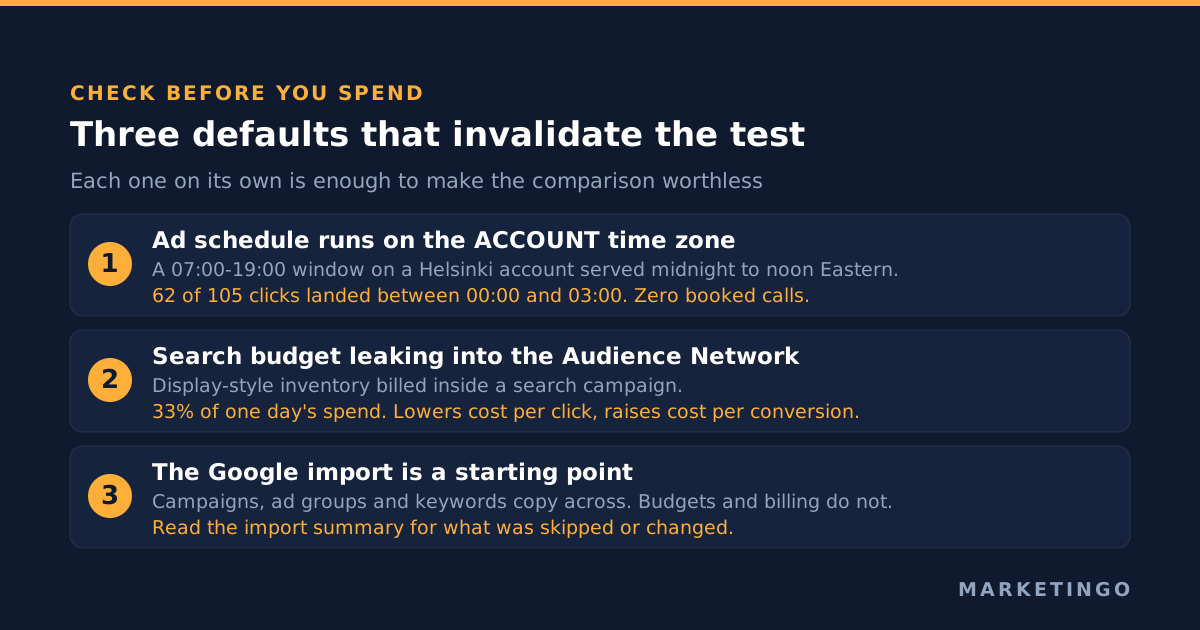
Our own Microsoft Advertising lead generation account was set to deliver between 07:00 and 19:00, which read as a sensible business-hours window. The account time zone was Helsinki. The campaigns were targeting the United States. So the window that looked like business hours actually ran from midnight to noon Eastern, the daily budget emptied at 03:46 Eastern, and 62 of 105 clicks in the period landed between midnight and 03:00 Eastern. The click through rate looked excellent. Booked calls came to zero.
This is documented behaviour rather than a bug. Microsoft's own campaign management reference states that the schedule's UseSearcherTimeZone element "determines whether to use the account time zone or the time zone of the search user where the ads could be delivered", and that if you leave it unset, "the default value of false will be set and the account time zone will be used" (Microsoft Advertising, Schedule Data Object). The same reference notes that updating a schedule and leaving the element null resets it to false, so a setting someone fixed once can revert the next time anybody touches the schedule.
If your account time zone does not match the market you are buying, every hourly figure in the comparison is shifted and the platform takes the blame.
Search budget leaking into the Audience Network
In the same account we found search campaigns serving on the Microsoft Audience Network, the display-style inventory that sits outside search results. On one day it took 33% of the spend. Audience Network traffic is not search intent traffic, and mixing it into a search-versus-search comparison moves the cost per click down and the cost per conversion up at the same time, which is the exact pattern people then misread as "Bing traffic is low quality".
Pull the ad placement report before you check anything else. If the Audience Network is carrying a third of a search campaign's spend, you are not comparing search platforms.
The import is a starting point, and Microsoft says so
The Google Import tool is genuinely good, and it is also the reason so many Microsoft accounts are stale. It copies campaigns, ad groups, keywords and some audience types, and it can be scheduled to run daily, weekly or monthly. Microsoft's own page for the tool advises reviewing and tailoring the imported campaigns for the Microsoft Search Network audience rather than leaving them unchanged (Microsoft Advertising, Import ad campaigns quickly and easily).
For a like-for-like test that advice cuts both ways. You want the import so the campaigns really are the same, and you want to check what the import skipped or changed, because the summary it produces flags exactly that. Billing and budgets do not come across at all, which is how a Microsoft campaign ends up budget-capped at a number nobody chose.
What the test showed: 38% cheaper clicks on one campaign, 76% on the other
With the setup held still, we ran the two funnels side by side across both platforms for four weeks and compared cost per click at campaign level rather than at account level, because an account-level average blends two different kinds of buyer.
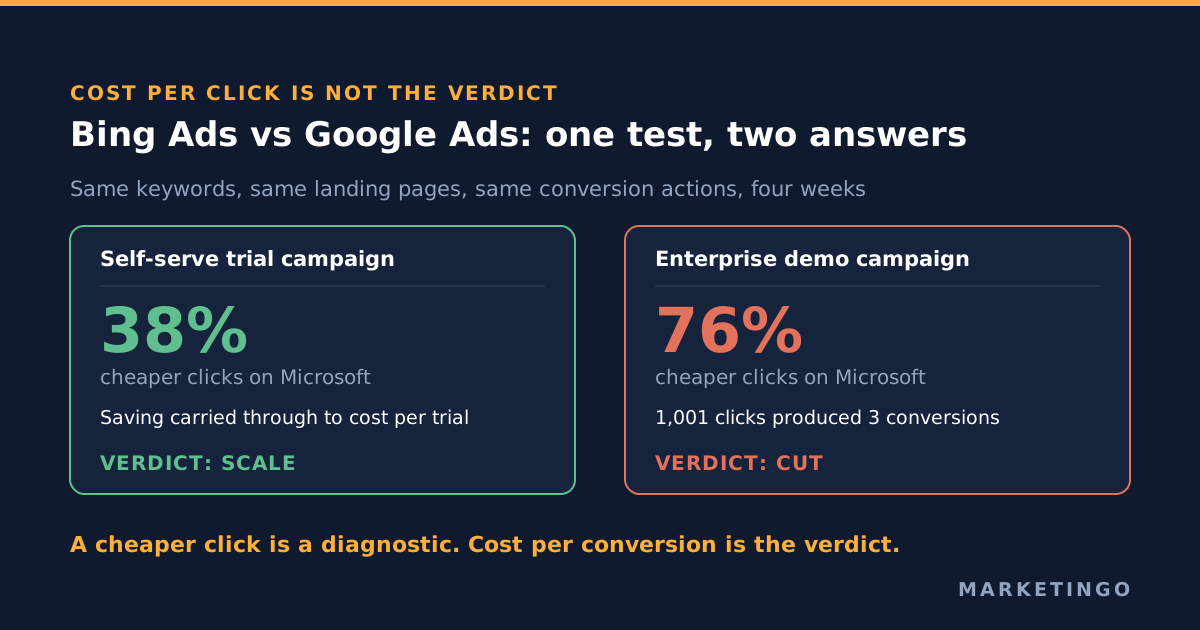
Microsoft delivered clicks 38% cheaper than Google on the trial campaign and 76% cheaper on the enterprise demo campaign. The pattern held week over week rather than appearing once, which is what made it worth acting on. On the trial funnel the saving carried all the way through: Microsoft trials came in at a cost per trial the Google campaigns could not match on the same keywords, and the account's published results show Microsoft cost per click falling from $5.42 to $2.87 and blended cost per conversion from $66.32 to $44.89 while spend rose 137%, in the compliance and document security case study.
So far this is the story everybody expects. The second number is the one worth the article.
The campaign where the cheap clicks bought nothing
The enterprise demo campaign, the one with the 76% cost per click advantage, was the worst performing line in the account on both platforms. On Microsoft it took 1,001 clicks to produce 3 conversions. The equivalent Google campaign aimed at competitor terms spent about $3,300 for 247 clicks and produced close to nothing. Across seven months the whole demo funnel booked 22 meetings.
A 76% discount on a click that converts at 0.3% is not a discount. It is a cheaper way to buy the wrong thing, and because the cost per click looked so good, the campaign had survived several reviews on that number alone.
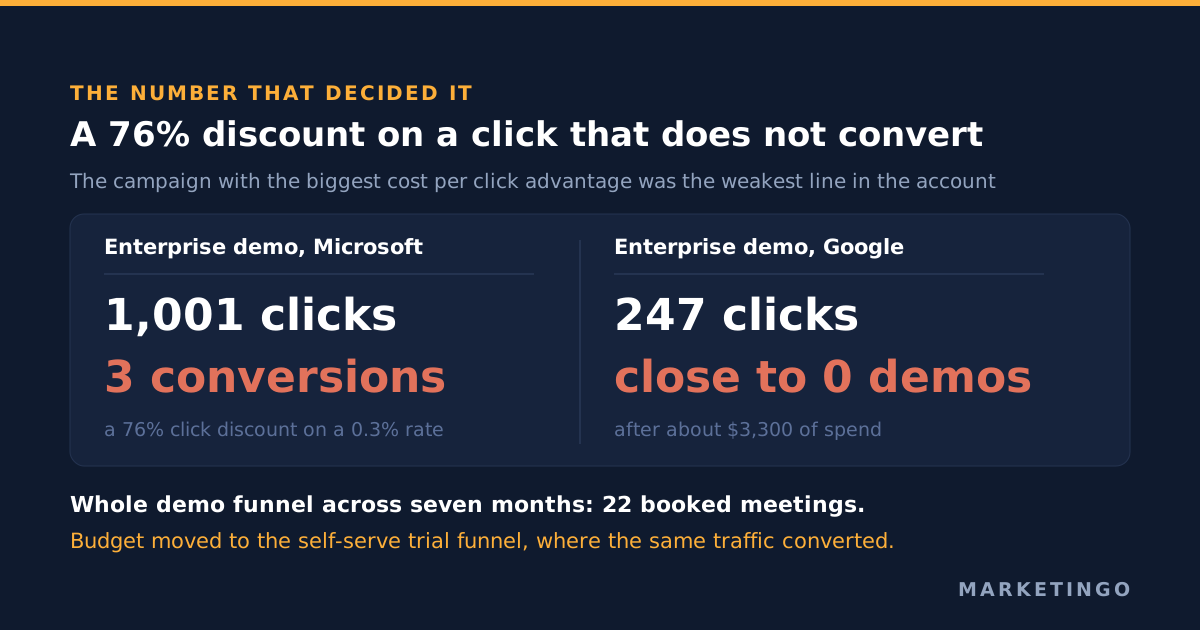
The honest read was that the platform was never the problem on that funnel. Asking cold traffic to book a sales call was the problem, on both platforms, and the cost per click gap had been hiding it. We moved the demo budget into the self-serve trial funnel, where the same traffic converted at a rate that supported the spend, and scaled Microsoft on the campaigns that were already converting rather than across the account.
Microsoft settled at roughly a quarter of combined spend. In a representative week late in the engagement the account spent about $3,650 across both platforms, roughly $2,780 on Google and $870 on Microsoft, producing 94 trials at just under $39 each. The clearest proof that the share was earned rather than tolerated came when the client's card failed and Microsoft stopped delivering for several days: about $190 a day of spend disappeared and 15% to 20% of weekly trials went with it.
How to run the test on your own account
- Match the inputs first. Same keywords and match types, same negative lists, same landing pages, same conversion actions, same attribution window. Write down any difference you cannot remove and treat it as a caveat on the result, not a detail.
- Fix the account time zone before you spend anything, and set the ad schedule deliberately rather than inheriting it. Then confirm in an hourly report that delivery lands where you intended.
- Exclude the Audience Network from search campaigns for the duration of the test, or segment it out of the reporting. Read the ad placement report on day two, not at the end.
- Run the import, then read its summary for what it skipped or changed, and set budgets yourself.
- Size the test on conversions, not on days. Decide in advance how many conversions each campaign needs before you will read the result, and set a stop rule for a campaign that spends past a click threshold without one. In our own account we paused an ad group after 59 clicks, about $36 and zero calls, against a rule of 40 clicks.
- Compare at campaign level on cost per conversion, then on the downstream action that actually matters, whether that is a purchase, a qualified meeting or a paying account. Cost per click is a diagnostic, never the verdict.
- Act per campaign. The answer is almost never "move to Microsoft" or "stay on Google". It is "this funnel is cheaper there and that one is broken everywhere".
If you want the arithmetic on whether the cheaper channel actually improves the account, our lead generation return on investment calculator will take a cost per lead and a close rate and tell you what the difference is worth in pipeline, which is the number to argue about rather than the cost per click.
When this does not apply
Microsoft's audience skews older, more desktop and more corporate, which is why it tends to work on business to business search and tends to disappoint on younger consumer categories. The test is still worth running, but set your expectations by the vertical, not by our numbers.
Below roughly a few thousand dollars a month in total search spend, the Microsoft side will not accumulate enough conversions in a month to read, and you will be interpreting noise. Run it for a quarter or do not run it.
If your conversion tracking is not trustworthy on both platforms, this test cannot be run at all, and no amount of patience fixes it. That is a tracking project first. Our field note on auditing a platform rep's recommendations covers the same principle in a different setting: the data has to be sound before the advice built on it means anything, and the same goes for a landing page test judged on the wrong conversion.
Finally, if you are choosing a partner to run the channel rather than running it yourself, the comparison you need is a different one, and our guide to the best Microsoft Advertising agencies is a better starting point than this article.
Check the cheaper channel before you scale it
Most accounts we audit have a Microsoft account that was imported once and left alone, and a strong opinion about whether the channel works that nobody has tested since. Those two facts are usually related.
Our Microsoft Ads management work for business to business software companies starts with the test described above rather than with a budget recommendation, because the account-level average almost always hides one funnel that is genuinely cheaper and one that is cheap and useless. If you want that read on your own account, our free ad audit covers both platforms, the tracking underneath them and the placement and schedule settings that quietly decide the answer.