Google Ads conversion tracking is free, takes about twenty minutes to install, and is the single input that Smart Bidding uses to decide how much of your money to spend on each auction. Almost every published guide covers the twenty minutes. Very few cover what the number means once it starts moving.
That gap is expensive. A tag that fires correctly on every page load is still a tag, and Google Ads will faithfully report whatever you told it to count. If you told it to count form interactions, it buys form interactions. If you told it to count a thank-you page that also loads after a newsletter signup, it buys newsletter signups. The account looks like it is working right up to the point somebody compares the Conversions column against the sales pipeline.
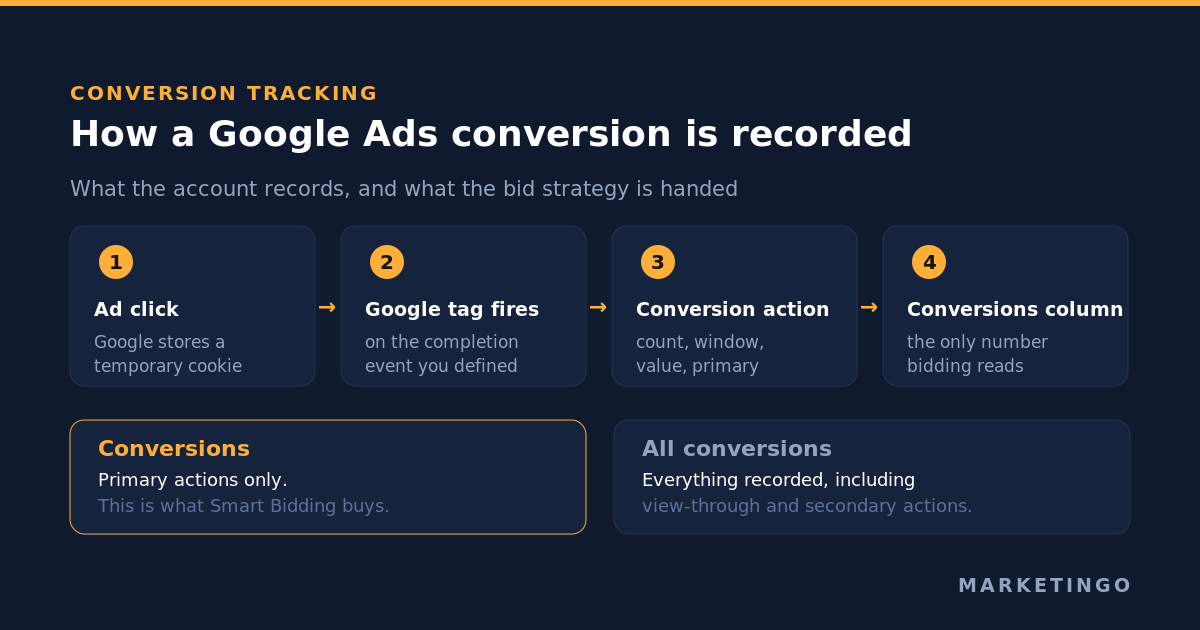
This is the operator's version: what the system records, the five settings that change the number, the one documented rule that overrides two of them, and how to check that what you are counting is a customer rather than a page view.
What Google Ads conversion tracking does
A conversion is an activity you have decided is valuable: a purchase, a signed quote request, a phone call, an app install. Conversion tracking is the machinery that connects that activity back to the click that produced it.
The mechanism is simple enough to hold in your head. Somebody clicks your ad. Google places a temporary cookie on that browser. When they later complete the activity you defined, a Google tag on your site fires, Google recognises the cookie and records a conversion against the campaign, ad group, keyword and creative that earned the click. Some conversion types let you track conversions without a tag at all: calls from call assets use a Google forwarding number, and Google Play installs are recorded without any code on your side.
Two reporting columns carry the result and they are not interchangeable. "Conversions" holds the activity you nominated for optimization. "All conversions" holds everything Google Ads recorded, including cross-device activity and view-through conversions. Google excludes view-through conversions from the main Conversions column deliberately, so that Smart Bidding optimizes toward active interactions rather than people who merely saw an ad.
Everything below is about which activities land in that first column, because that column is the brief you hand the bidding algorithm.
Where the number comes from: four data sources
Before you create anything, Google asks where your conversions happen. The answer determines your setup more than any later choice.
Website conversions cover purchases, signups and any other completion on your site. This is the default path for most advertisers and the one the rest of this article focuses on.
Phone call conversions cover calls from your ads, calls to a number on your website, and taps on a mobile number. Calls have a quirk worth knowing: Google Ads attributes them to the date of the ad click, not the date of the call, and you can set a minimum call length so that a nine-second wrong number is not recorded as a lead.
App conversions cover installs and in-app activity, handled through App Connect.
Offline conversions cover anything that completes away from your website, which in lead generation is most of the revenue. These are imported rather than tracked, and they are the subject of a section further down.
Then you choose the signal itself. Google Ads lets you measure website activity either through Google Analytics or through the Google tag, and its own guidance draws a clear line between them: the Google tag is the recommendation "if you want a dedicated tracking signal optimized specifically for Google Ads bidding", and specifically if you require Ads features such as enhanced conversions. Importing from Google Analytics reuses tracking you already have, at the cost of a longer chain and a set of prerequisites people discover the hard way: only events marked as key events are eligible for import, you need Admin access in Google Ads plus Edit access in the linked property, and after linking or marking an event it takes 24 to 48 hours before the import option appears at all.
Most accounts we take over are running both, double-counting the same purchase under two names, with neither one cleanly wired to the bid strategy. Pick one primary signal per activity and make the other observation only.
How to set up Google Ads conversion tracking
The setup flow itself is short.
- In your Google Ads account, open the Goals menu, then Conversions, then Summary, and create a new conversion action.
- Choose the source: website, app, phone calls or import.
- Define the activity and its category. The category is not cosmetic, because Google groups actions into conversion goals by category and campaigns bid on goals.
- Set the value, the count setting and the conversion window. Those three are covered below and they matter more than anything else on this screen.
- Install the Google tag on every page, then fire an event snippet on the completion event, carrying the conversion ID and label for that action.
- Test with Google Tag Assistant before you trust a single row of reporting.
A new action showing "Unverified" or "Inactive" is normal. Google Ads only flips the status to Active after it records the first conversion or a successful test event, so an empty status on day one is not evidence of a broken install.
Setting it up with Google Tag Manager
When you are using Google Tag Manager, the container holds the Google tag and one Google Ads conversion tag per action, fired by a trigger you control. Two configuration details cause most of the failures we see.
The first is the Conversion Linker tag. Without it, click information is not preserved across pages and conversions go unattributed on browsers that restrict third-party storage. Google lists a missing or misconfigured Conversion Linker among the first things to check when conversions come in lower than expected.
The second is trigger scope. A tag fired on all pages, or on a thank-you page that several different journeys can reach, will record activity you never intended to buy. Fire on a specific event pushed by your site at the moment of completion, not on a URL that happens to be reachable by other routes.
Primary and secondary actions, and the exception that overrides them
This is where the quiet damage happens.
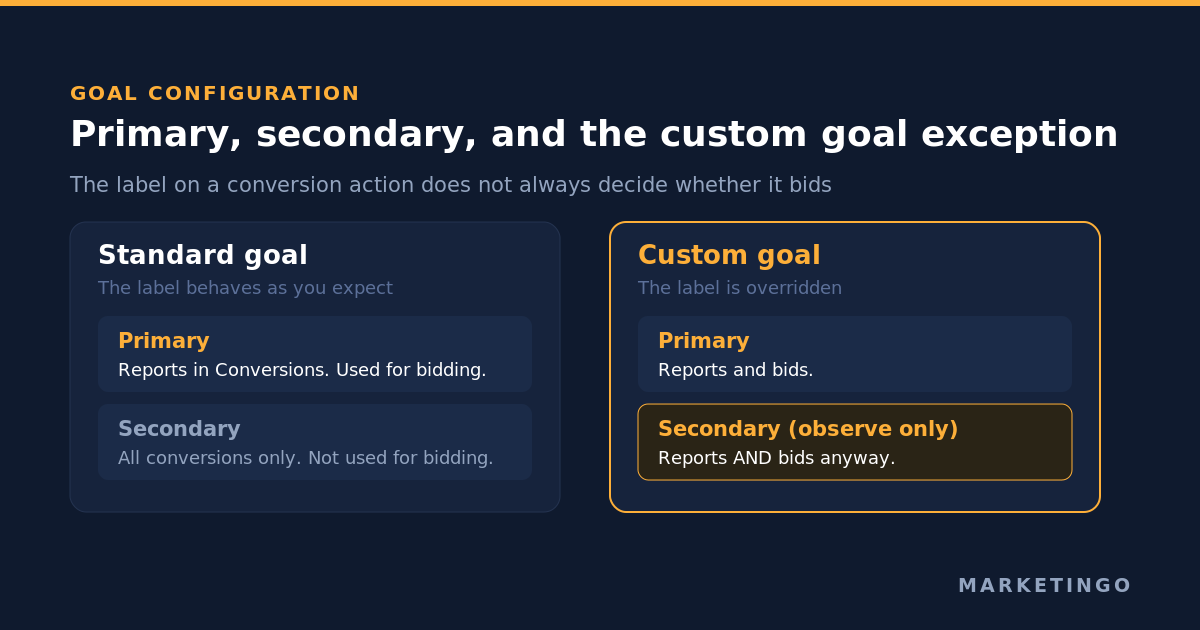
Every conversion action sits inside a conversion goal, and inside that goal it is marked primary or secondary. Google's definitions are precise. Primary actions are reported in the Conversions column and used for bidding, as long as the standard goal they belong to is used for bidding. Secondary actions are for observation only: they report in All conversions and are not used for bidding.
So far, so intuitive. Now the exception, which is stated in the same documentation and which almost nobody accounts for when auditing an account:
Conversion actions included in a custom goal are used for reporting and bidding regardless of whether they are set as "primary" or "secondary" actions.
Read that twice if you manage accounts. The primary and secondary switch is the control every advertiser reaches for when they want to stop bidding toward a weak signal. Inside a custom goal, that switch does nothing. If a campaign uses a custom goal containing your newsletter signup, the algorithm is buying newsletter signups, and the interface will show that action politely labelled "Secondary (observe only)" the whole time.
There is a second trap in the same area. Conversions created from Google Analytics arrive secondary by default, and can only be changed to primary inside Google Ads, not in the Analytics interface. Teams who migrate their measurement into Analytics and assume the campaigns followed are often bidding toward nothing at all, with a Conversions column at zero and a very healthy All conversions column beside it.
The practical rule: audit the goal, not the label. Open every goal a campaign is using, list the actions inside it, and decide for each one whether you would be happy paying for it. Whatever you would not pay for does not belong in a goal that bids.
One timing note before you start changing things. Smart Bidding runs a 7 to 14 day learning phase, and edits to budgets, targets or conversion goals restart it. Make the tracking corrections in one deliberate pass rather than five over a fortnight.
Count: every conversion, or one
Each action carries a Count setting with two options, and the choice changes your reported volume, your cost per conversion and what the bidding optimizes toward.
Every conversion records every completion that follows an ad interaction. One conversion records a single completion per ad click, no matter how many follow. Google frames the choice around what adds value: every sale is worth counting, whereas usually only one unique lead per ad click adds value to your business.
The defaults are not uniform and they are not obvious. Every conversion is the default for website activity, in-app activity, Analytics transactions and imports. One conversion is the default for calls from ads, Analytics goals, calls to a number on your website, and app installs. So an account that tracks leads through a website form and leads through a phone call is, by default, counting the two in different units, and nobody has to have touched a setting for that to be true.
For a lead generation account the setting is usually One, and getting it wrong inflates lead volume in exactly the way that makes a channel look cheaper than it is. If you want the real picture of what you are managing toward, read this alongside what a good cost per lead looks like for your margin.
There is a reporting column that makes this measurable rather than theoretical, and it is one of the most useful and least used numbers in the interface. The repeat rate in the Conversion actions table is the average number of conversions from interactions that converted at least once, which is effectively the Every figure divided by the One figure. Crucially, the repeat rate does not change when you change the Count setting. A repeat rate of 1.5 with 10 conversions under One means switching to Every would report 15. You can therefore see what the other setting would have shown you without changing anything and resetting your learning phase.
Transaction IDs are a different control
A recurring confusion is worth settling. Setting Count to One is not a deduplication mechanism, and a transaction ID is not a count setting. Google separates them explicitly: use One when you want a single lead per click, and use a unique transaction ID when you want every purchase counted but never counted twice. The transaction ID is the recommended option for purchases, because a customer reloading the order confirmation page should not generate a second sale.
Two footnotes that cost real money when missed. A transaction ID that is not genuinely unique causes significant undercounting, because Google Ads may process only the first instance of a repeated ID. And the failure is usually silent, because it comes from a template variable that never resolved. Google publishes the pattern list, and it reads like a tour of every broken checkout page on the internet: unrendered snippets such as {{ order_number }}, placeholders such as thank_you or 1234, and values that are actually prices, URLs or email addresses.
Conversion windows, and the fact that they are never retroactive
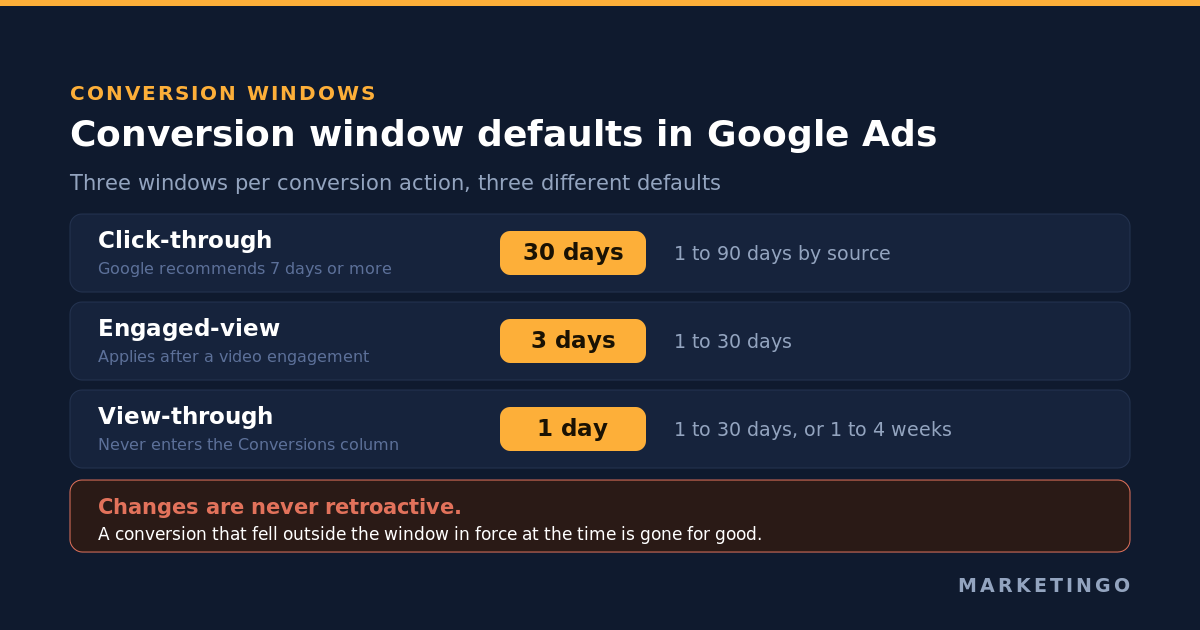
The conversion window is how long after an ad interaction a completion still counts. Three windows exist per action, with three different defaults: click-through defaults to 30 days, engaged-view to 3 days and view-through to 1 day. Click-through can be set anywhere from 1 to 90 days depending on the source, and Google recommends at least 7 days because shorter windows starve the data.
Two consequences matter operationally.
A window shorter than your sales cycle hides revenue you earned. Google's own worked example is blunt: set 7 days, and a conversion on day 8 is never recorded, never appears in reporting, and never reaches the bid strategy. For a considered B2B purchase on a 45-day cycle, a 30-day default window means the algorithm is optimizing against a systematically truncated view of which keywords produce customers. The Attribution time lag report tells you what your actual distribution looks like, and it is the right input for this decision.
The second consequence is the one that catches people out, because it damages your conversion data permanently rather than temporarily. Window changes are never applied retroactively. Google's example walks through it: a click on March 1 under a 30-day window, shortened to 10 days on March 7, then widened to 20 days on March 16. The conversion that happened on March 13, outside the window in force at the time, is not retroactively counted. Change a window and you create a permanent seam in your own history. Decide once, from the time lag report, and leave it alone.
Conversion values: the setting that turns reporting into steering
A conversion without a value is a conversion the algorithm assumes is interchangeable with every other conversion in the goal. That assumption is fine for an ecommerce store selling one product at one price, and wrong everywhere else.
For ecommerce, pass the real transaction value dynamically, with the currency, alongside the transaction ID. That gives you Maximize conversion value and target return on ad spend as bid strategies, and it gives the model a reason to prefer a $400 basket over a $40 one. The mechanics of the resulting metric are covered in our piece on how to calculate return on ad spend correctly.
For lead generation, values are usually left blank, and that is the biggest avoidable loss in the category. You rarely know what a specific lead is worth at the moment the form submits, but you do know what each lead type is worth on average: a demo request from an enterprise form is not worth the same as a pricing page download. Assign static values per action that reflect your close rate multiplied by average deal value, and the bidding starts sorting your traffic by revenue rather than by volume. Our lead generation return on investment calculator will give you the per-lead figures to use, and the ecommerce return on ad spend calculator does the equivalent job on the retail side.
Enhanced conversions, and enhanced conversions for leads
Cookie-based measurement misses matches. Enhanced conversions closes part of that gap by sending hashed first-party data alongside the conversion, so Google can match it to a signed-in account that engaged with your ad.
The privacy mechanism is worth stating accurately, because clients ask. The data is normalised and hashed with SHA256, a one-way hashing algorithm, before it leaves your site. Normalisation means trimming whitespace, lowercasing, formatting phone numbers to the E.164 standard, and stripping the periods that precede the domain in Gmail addresses. Google never receives the plain email address.
There are two variants and they solve different problems.
Enhanced conversions for web improves measurement of activity that completes on your website. If you sell online, this is the one, and it is a straightforward uplift on existing purchase measurement.
Enhanced conversions for leads improves measurement of transactions that complete off your website, from a lead your website captured. The hashed data from your form is later matched against the offline outcome you import, which means you can report a closed deal back to the click that started it without ever storing a click identifier in your customer relationship management system. For anybody selling high-ticket B2B services, this is the feature that makes the pipeline visible to the bidding.
Server-side tagging, and where conversion measurement is going
Browser-based measurement keeps losing ground. Ad blockers, browser storage restrictions and consent requirements each remove a slice of the signal, and none of them are going to reverse. Server-side tagging is the current answer: instead of the browser sending the conversion event straight to Google, it sends it to a tagging server you control, which forwards it on.
The practical gains are real but narrower than the vendor pitch suggests. You get better control over what data leaves your site, longer-lived first-party cookies, and resilience against client-side blocking. What you do not get is an exemption from consent rules or a way to measure people who refused to be measured.
Two things matter more for most advertisers than the server itself. The first is that your server-side setup must still send a properly formed conversion event, with the same identifiers and the same deduplication logic, or you have simply moved the problem to a machine you now also have to maintain. The second is that server-side Google Ads measurement is a project with a running cost, and it should be sequenced after the goal configuration, count settings, windows and values are correct. A perfectly engineered pipeline that delivers the wrong event tracking definition to the bid strategy is worse than a plain browser tag delivering the right one, because it costs more and feels more authoritative.
Offline conversion import: measuring customers instead of form fills
If your sale completes on a call, in a showroom or after a procurement cycle, everything above still only measures the enquiry. Offline conversion import is how the outcome gets back into the account.
The pattern is the same everywhere. Capture the Google click identifier when the lead arrives and store it against the record. When the deal closes, upload the click identifier, the conversion name, the timestamp and the value, through a file, the application programming interface or Data Manager. Google Ads attributes the closed deal to the original click, and the bid strategy starts optimizing toward revenue rather than enquiry volume.
Four constraints decide whether the upload works, and all four are documented rather than folklore:
- The click identifier must be within 90 days. A sales cycle longer than that needs enhanced conversions for leads instead, matching on hashed contact data rather than on the click.
- The conversion action source must be set to "Manual uploads" or "Other", not "Website".
- The action names in your file must match the names in the account exactly.
- Processing takes 24 to 48 hours, and the Diagnostics tab carries the specific error log when rows are rejected.
This is the step that separates an account managing cost per enquiry from an account managing customer acquisition cost, and it is why our full-funnel strategy work starts with measurement rather than with campaign structure.
Two accounts where the tracking was the campaign problem
Abstract arguments about measurement lose to specifics, so here are two from our own delivery.
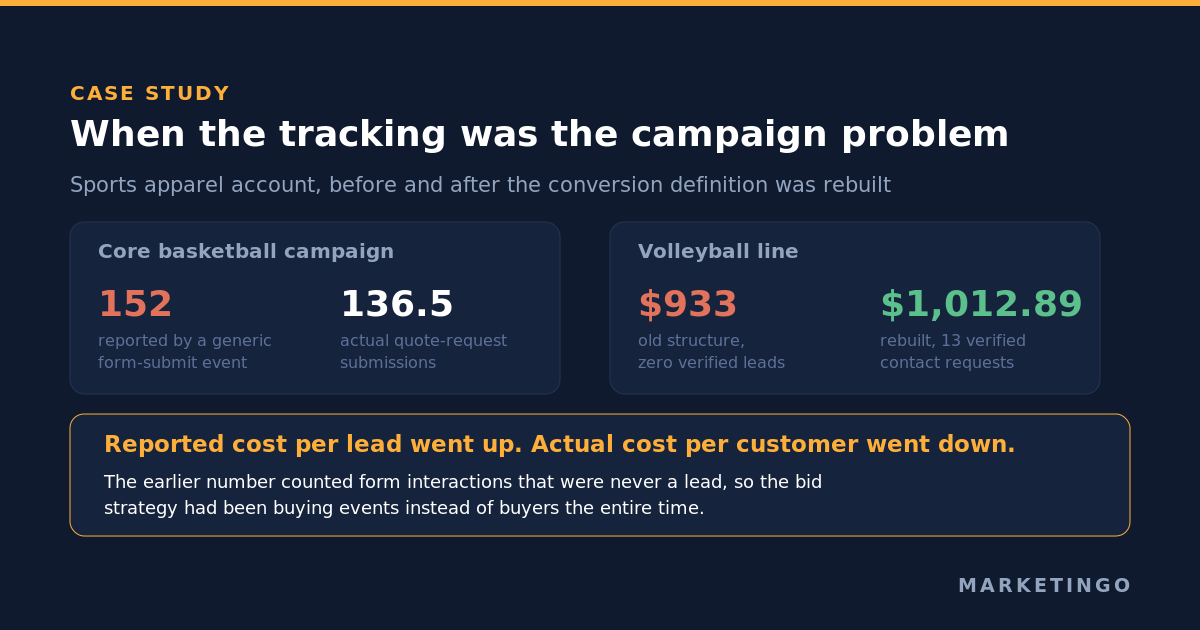
A sports apparel manufacturer selling to teams and clubs came to us with a Google Ads account built on a generic Google Analytics form-submit event. Nobody had asked what the event was firing on. In the core basketball campaign, that event reported 152 conversions against 136.5 actual quote-request submissions, and the difference was form interactions that were never a lead. The volleyball line looked worse and was more revealing: the previous structure had spent $933 on search with zero verified enquiries to show for it, while the rebuilt campaign spent $1,012.89 and produced 13 verified contact requests. Reported cost per lead rose sharply after the rebuild. Actual cost per customer fell, because the earlier number had been counting events instead of people.
A compliance and document security software company showed the second failure mode. Search ran on one blended goal, so the algorithm chased the cheapest available action, mostly trial signups, instead of plan purchases and enterprise demo bookings. Splitting search into an enterprise demo funnel and a self-serve trial funnel, each with its own conversion goal, moved demo bookings from 14 to 32 a month and cut blended cost per conversion 11.2% on a near-flat budget. No new budget, no new channel. The goal configuration was the campaign.
The same discipline sits behind the results on our Google Ads management engagements generally, including the regulatory compliance client whose cost per lead fell from $112 to $40.25 over six months, and the home improvement account that grew conversions 400% across Google and Microsoft Ads.
Checking that it works, and the failures that survive a green tag
Verification has two halves, and most advertisers only do the first.
Does the tag fire? Use Google Tag Assistant on a live test completion and confirm the conversion request is sent with the values you expect. For purchases, check that the transaction ID is populated, unique and different on a second test. You can also inspect the network request to googleadservices.com/pagead/conversion in Chrome developer tools and confirm the oid parameter carries a real value.
Does the number mean what you think? This is the half that matters and no tool answers it. Four checks:
- Reconcile a full month against the source of truth. Count the enquiries in your customer relationship management system or the orders in your commerce platform, and compare against the Conversions column for the same period, allowing for the conversion window. A gap of a few percent is attribution. A gap of 12% is a definition problem, as it was in the sports apparel account. The same reconciliation also tells you whether the conversion rate you have been reporting to the business is real.
- Open every goal in use and list the actions inside it, including the ones labelled secondary, because of the custom goal rule above.
- Check the Count setting on each action against what you actually sell.
- Check the conversion window against the time lag report rather than against the 30-day default.
Do not panic about short-term gaps before they are real. Google Ads conversions are recorded against the date of the ad click, so a long window means today's spend is still collecting conversions weeks from now, and yesterday's cost per conversion is always overstated in the Google Ads reports you look at this morning.
| Check | What to look at | What "wrong" looks like |
|---|---|---|
| Goal membership | Every conversion goal a campaign uses | A low-value action inside a custom goal, bidding despite its secondary label |
| Source of signal | Google tag against Google Analytics import | The same purchase counted twice under two names |
| Count setting | Each action's Count value | Website leads counting Every, phone leads counting One, in the same report |
| Conversion window | Attribution time lag report | A 30-day default against a 45-day sales cycle |
| Values | Value column on each action | Blank values on a lead generation account with mixed deal sizes |
| Deduplication | Transaction ID on purchase events | An unresolved template variable or a static placeholder |
| Offline outcomes | Import status and Diagnostics tab | Enquiries measured, closed deals not |
| Verification | Tag Assistant plus a monthly reconciliation | A green tag and a 12% gap against the pipeline |
Get your conversion tracking checked before you change your bids
If the Conversions column and the sales pipeline disagree, the campaign settings are the wrong thing to argue about. Fixing measurement first is usually the cheapest performance improvement available in an account, because it costs no additional budget and it changes what every future dollar buys.
Our free advertising audit covers this ground directly: what your goals contain, what your actions count, whether the windows and values match your business, and what the reported numbers would look like corrected. It applies across Google Ads, Microsoft Ads, Meta and LinkedIn, which matters because each platform has its own version of these decisions. If you want to read further first, our 12-point Google Ads audit checklist covers the account structure side, Performance Max covers the campaign type most affected by a weak conversion signal, and break-even return on ad spend covers the number your corrected data should be judged against. Software companies can see how this plays out on an AI and software account, and retailers on the ecommerce side.