Google Ads offers two attribution models: last click, which gives all credit for a conversion to the final clicked ad and its keyword, and data-driven attribution, which splits that credit across the ad interactions on the path using your own account's history. The other four models were removed in 2023. If you are still choosing between six, you are reading advice that has been out of date for three years.
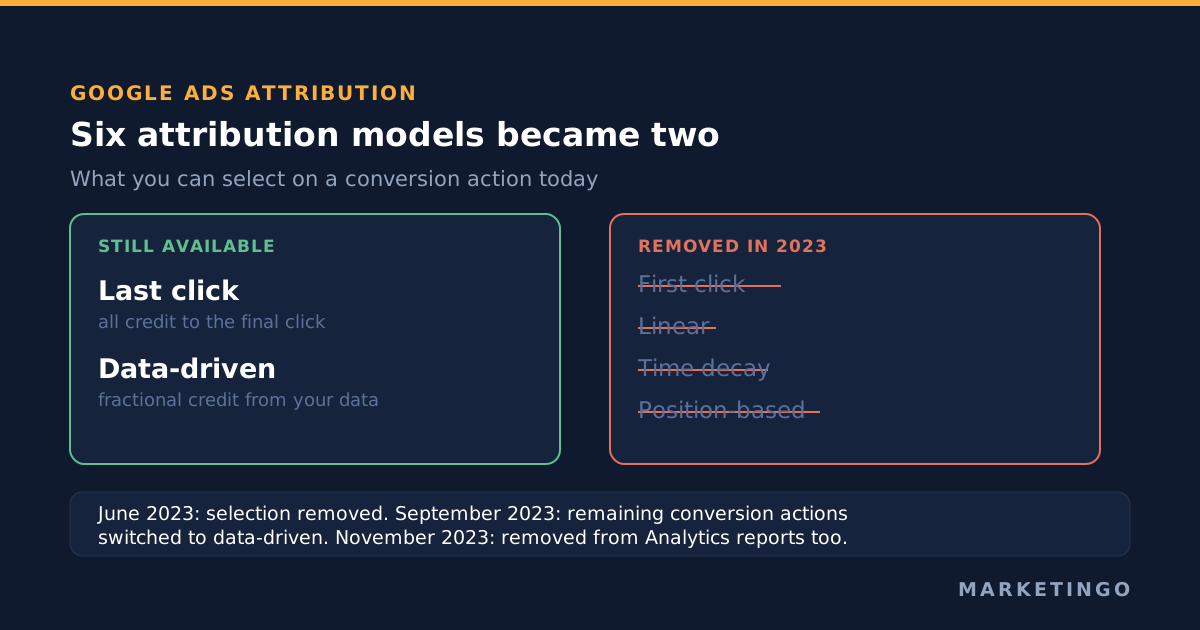
The four models Google removed, and the dates
Google's own documentation is blunt about it. The Google Ads help page on attribution models states that "the first click, linear, time decay, and position-based attribution models are no longer supported by Google", and that "conversion actions that used the deprecated attribution models have been upgraded to use data-driven attribution" (Google Ads Help, About attribution models).
The removal ran on a published timeline. Google's deprecation notice says that "starting in June 2023, we'll remove the ability to select first click, linear, time decay" and position-based for conversion actions that were not already using them, and that "starting in September 2023, we'll switch any conversion actions still using these models" over to data-driven attribution. The same notice confirms what survived: "data-driven attribution, last click, and external attribution won't be impacted" (Google Ads Help, Deprecation of attribution models).
The reporting went with it. Google says "these rules-based models will also be removed from reporting throughout the rest of Google Ads", naming the Overview page and the model comparison report in the Attribution section. So the tool that practitioners used to argue about model choice, the one where you could see the same conversions counted six different ways, no longer has six ways to show you.
Google Analytics 4, the free analytics product that feeds many Google Ads conversions, made the same cut slightly later. Its Attribution reports now carry three models: data-driven attribution, paid and organic last click, and Google paid channels last click. The documentation states that "the first click, linear, time decay, and position-based attribution models are no longer available as of November 2023" (Google Analytics Help, About attribution and attribution modeling).
The claim worth interrogating
Search for attribution models in Google and you will still be handed a decision framework: first click attribution if you care about demand creation, linear if your sales cycle is long, time decay attribution if recency matters, position-based if you want to reward the introduction and the close. That framework was reasonable advice in 2021. It describes a dropdown that no longer exists, in a product whose default attribution model has since changed underneath it.
This is not a fringe problem in the results. One of the pages ranking on the first page for this topic is a complete guide to using the linear attribution model in Google Ads, written as though you could still select it. Several others walk through all six models and only mention the deprecation in passing, if at all. Anyone following that advice will open their conversion settings, find two options, and conclude they are looking at the wrong screen.
So the useful version of this topic is not "which of the six should you pick". It is: given that you have two, where did the decision actually move?
Last click, and what it hides
Last click attribution gives the whole conversion to the last ad interaction before the conversion. It is simple, it is stable, and it is the only remaining way to opt out of data-driven attribution. Google says so directly: "if you don't want your conversions to use data-driven attribution, you'll be able to use the last click model."
The cost of that simplicity is predictable and worth stating plainly, because it changes budget decisions. Under a last click model, every campaign whose job is to create demand rather than capture it reports as a loss. A broad match prospecting campaign that introduces 400 people to the product, 30 of whom come back a week later through a brand search and convert, earns zero conversions. The brand campaign earns 30. If you then reallocate budget from the first to the second, the brand campaign's numbers hold for a quarter and then start to sag, because nothing is filling the top of the conversion path any more. This is the single most common way a Google Ads account quietly shrinks its own addressable demand.
Last click is still the right choice in two situations. The first is when your conversion volume is too low for any model to learn anything useful, which in practice means a handful of conversions a month. The second is when your account genuinely has one touch: a single-campaign account selling an impulse purchase, where the conversion path holds one click and there are no other touchpoints to distribute credit across.
Data-driven attribution, and what changed underneath it
The data-driven attribution model looks at the conversion paths in your own account and compares paths that converted against paths that did not. The model assigns fractional credit to each ad interaction, which is Google's name for the individual touchpoints on a path, according to how much that interaction appears to have changed the outcome. A conversion can come back as 0.42 of a conversion on one keyword and 0.58 on another. The model uses your data, not an industry average, which is why two accounts in the same vertical can get very different credit distributions.
Two changes matter more than the mechanics. First, data-driven attribution became the default for all new conversion actions. Second, and this is the part that gets missed, Google removed the volume thresholds that used to stand in front of it. The announcement says Google is "removing the data requirements for campaigns" so advertisers can use data-driven attribution for every conversion action, and that it is "adding support for more conversion types, including in-app and offline conversions" (Google Ads blog, Data-driven attribution becomes the default).
Read those together and the implication is uncomfortable. Before, an account had to earn its way into data-driven attribution by producing enough conversions and paths for the model to fit. Now every new conversion action starts there regardless of volume. A business doing 12 conversions a month gets the same model as one doing 12,000, and the fractional credit it reports is drawn from a conversion path sample far too small to mean much. The number still looks authoritative in the Conversions column, and Smart Bidding still buys against it.
That is not an argument for switching everything to last click. It is an argument for knowing which of the two your account is on, and for not treating fractional credit from a thin account as a measurement.
Where the real control moved: the conversion window
With four models gone, the conversion window is now the most consequential attribution setting in the account, and it is the one almost nobody audits. It decides how long after an ad interaction a conversion can still be counted at all.
Google's defaults, from its own documentation: Search and Display campaigns get "a 30-day default window" for click-through conversions, the engaged-view window defaults to 3 days, and the view-through window defaults to 1 day. You can set a window "anywhere from 1 to 90 days, depending on the source of conversions", the engaged-view window from 1 to 30 days, and the view-through window from 1 to 30 days. Google recommends windows of at least 7 days (Google Ads Help, Set a conversion window).
Three things about that setting deserve more attention than the model dropdown ever did.
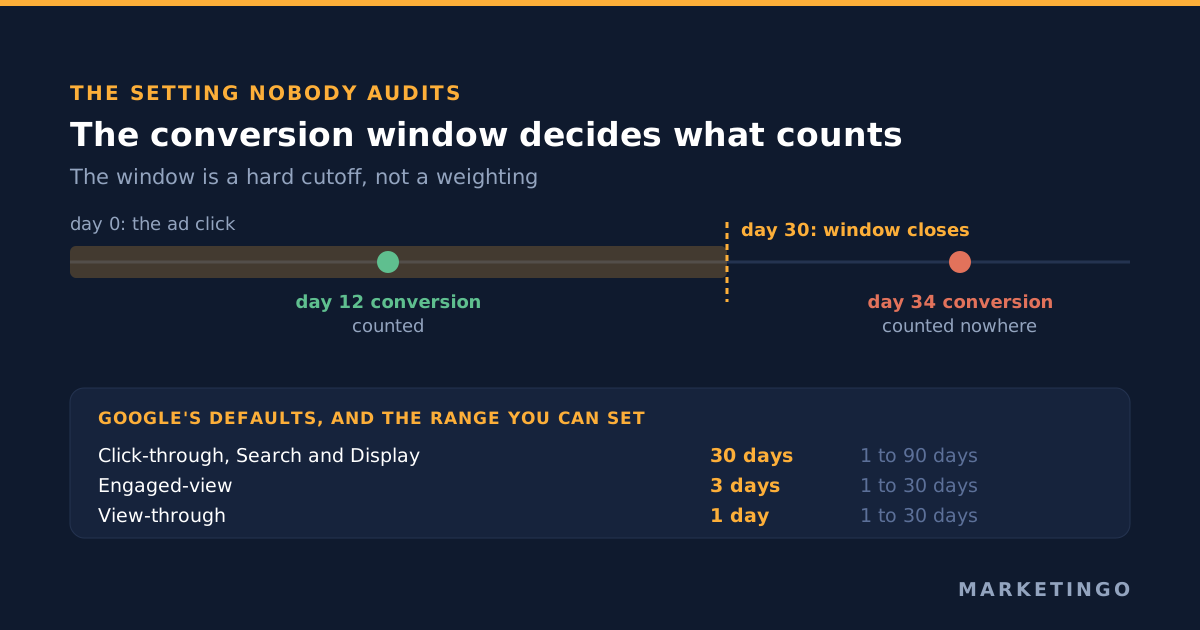
It is a hard cutoff, not a weighting. Google states that "only last-click conversions that are within the conversion window you choose will be shown". A conversion that lands on day 34 of a 30-day window is not credited to a different channel. It is not credited at all, anywhere in Google Ads. For any business with a considered purchase, a 30-day default silently deletes real revenue from the account's view of itself.
Changes are not retroactive. Google says window changes apply going forward only. So widening a window does not repair your history, it creates a step change in your reported performance on the day you touch it, which will be read as a performance improvement by anyone comparing month on month. Note the date you changed it, and compare like with like afterwards.
Where you change it depends on another setting. If your attribution setting is Google paid channels, you change conversion windows in Google Ads. If it is paid and organic channels, the change has to be made in Google Analytics. Teams that do not know this spend a long time looking for a control that is not in the product they are looking at.
Which conversions get credit at all: primary and secondary
The second place the decision moved is the conversion action list, and this one is binary rather than fractional. A conversion action only enters the Conversions column and only informs automated bidding if it is marked as a primary action. Google's documentation on account-default conversion goals is explicit that a conversion action "must be marked as a primary action" to be included, and labels the alternative "secondary (observe only)" (Google Ads Help, About account-default conversion goals).
This is where most attribution problems in real accounts actually live. Not in the model, but in a conversion action list where a newsletter signup, a brochure download and a demo request are all primary, all weighted equally, and all being bought by the same bid strategy. No attribution model can rescue that, because the model distributes credit for conversions you have already told Google to treat as equivalent. Fix the goal list first, then care about the model.
The practical test is one question per conversion action: would you pay the same amount for this as for a demo request? If not, it belongs in secondary, or it belongs in primary with a conversion value that reflects what it is actually worth. Our own write-up of Google Ads conversion tracking covers the settings behind that in more detail, and Google Ads bidding strategies covers what each bid strategy does with the values once they arrive.
For a compliance and document security software company we manage, the work that moved cost per trial down about 58% was almost entirely of this kind: cleaning up what counted as a conversion and what the bidding was allowed to buy, rather than changing the attribution model. The full numbers are on the case study.
Google Ads and Google Analytics 4 will not agree, and that is correct
Two models with the same name in two products do not count the same thing, and the gap sends teams looking for a bug that is not there.
Google Ads counts a conversion against the date of the ad interaction. Google Analytics 4 counts it against the date it happened. Google Ads can credit view-through and engaged-view conversions; the Google paid channels model in Analytics credits "the last Google Ads channel that the customer clicked through before converting", and falls back to paid and organic last click when there is no Google Ads click in the path. Analytics also sees organic search, direct and referral traffic as eligible to take credit, which Google Ads cannot.
So an account where Google Ads reports 180 conversions and Analytics reports 140 for the same month is usually working exactly as designed. The useful habit is to pick one of them as the system of record for a given decision and stay there. Use Google Ads data to make in-platform bidding and budget decisions, because that is the data the bid strategies are trained on. Use Analytics, or better still your own customer relationship management system, to judge whether those conversions turn into revenue. Our piece on lead conversion rate is about that second question, and the lead generation return on investment calculator takes the close rate and the deal value and tells you what a lead is worth before you argue about who gets credit for it.
The same discipline applies on the ecommerce side, where Google Ads revenue and the figure in the shop's back office rarely match either. Work from one source and use the ecommerce return on ad spend calculator to decide the number you can afford, rather than trying to reconcile two systems that were built to count differently.
Auditing your attribution setup in about 20 minutes
This is the order we work in, and it deliberately leaves the model choice until last, because by the time you get there the answer is usually obvious.
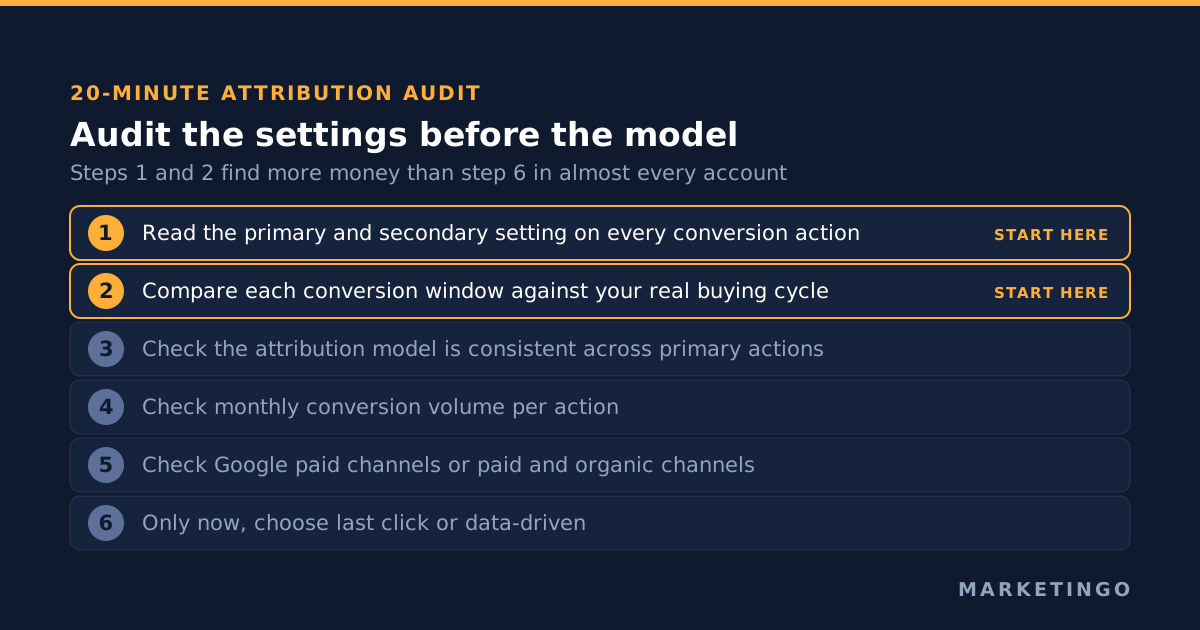
- Open the conversion actions list and read the Conversions column setting on every row. Write down which are primary and which are secondary. Most accounts have at least one thing marked primary that nobody would knowingly bid on.
- Check each primary action's conversion window. Compare it against how long your buying cycle actually takes, measured from your own sales data rather than from a benchmark. If your median time from first click to closed deal is six weeks, a 30-day window is discarding a meaningful share of your conversions.
- Check the attribution model on each primary action. You are looking for consistency, not for a particular answer. An account where the demo request uses data-driven attribution and the phone call uses last click is producing two incompatible sets of numbers in one column.
- Check your conversion volume per action per month. Under roughly 15 a month, treat the fractional credit from a data-driven model as directional at best, and consider last click for the reporting clarity.
- Check the attribution setting, Google paid channels or paid and organic channels. This determines where your conversion windows are edited and which marketing channels can take credit in Analytics.
- Only now, decide the model. Data-driven if you have the volume and more than one campaign type contributing to the conversion path. Last click if volume is thin, or if the account genuinely has a single touch.
Steps 1 and 2 find more money than step 6 in almost every account we audit. That is the real consequence of Google's 2023 decision: it took away a choice that practitioners spent a lot of time on, and left in place two settings they spent almost none on.
When model choice genuinely does not matter
There are accounts where this entire question is a distraction, and it is worth saying so rather than selling the analysis.
If you run one search campaign on brand terms only, every model will give you the same answer, because there is one ad interaction on the path. If your conversion volume is in single digits a month, no model has enough data to say anything and you should be looking at the offer and the landing page instead. If your conversions are not tied to revenue at all, meaning nobody can say what a conversion is worth, then fixing attribution improves the precision of a number that was never the right number. Go and set conversion values first.
Attribution is a measurement problem, and measurement only pays when there is a decision waiting on it. More conversion data does not help a team that has no budget decision to make with it, which is the quiet failure of a lot of digital marketing measurement work. The question that makes the hour worth spending is always the same: is there a campaign you would fund differently if you trusted the credit?
What to do with this
If you are running a single campaign type and counting one conversion action, keep last click, set a conversion window that matches your sales cycle, and spend your time elsewhere. If you are running search alongside Performance Max or paid social, and your conversion path routinely has more than one touch, data-driven attribution is the better of the two models available to you, as long as you have the volume to support it. Our write-up of Performance Max covers why multi-touch paths are the norm rather than the exception in that campaign type.
Either way, audit the conversion window and the primary conversion actions first. We find the same two defects in most accounts we look at: a 30-day window on a 90-day sales cycle, and a conversion goal list that treats a brochure download as a sales conversation.
If you would like a second pair of eyes on it, a free ad audit covers exactly this: what your account is counting, what it is discarding, and what your bidding is being told to buy. We run it across Google Ads management for business to business and high-ticket lead generation and for ecommerce, and the attribution and conversion settings are the first thing we read, before any campaign structure or creative. The cost per lead article is a good companion if you want to know what a sensible number looks like once the counting is fixed.