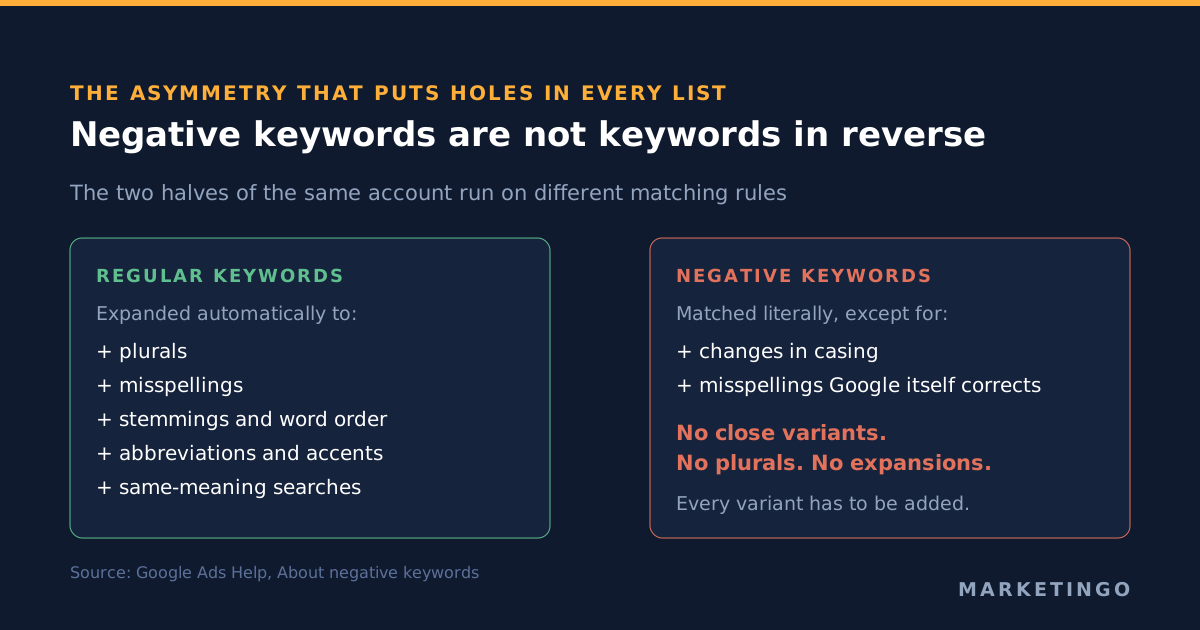
A negative keyword tells Google Ads which searches should not trigger your ads. That is the whole of the definition, and it is where most advice stops. The part that decides whether your exclusions work is an asymmetry Google documents in one sentence and almost nobody quotes: "Negative keywords won't match to close variants or other expansions" (Google Ads Help, About negative keywords).
Regular keywords do match close variants. Plurals, misspellings, stemmings, abbreviations and accents are all pulled in automatically on the positive side. On the negative side none of that happens. So the two halves of the same account run on different matching rules, and a negative keyword list assembled on the assumption of symmetry has holes in it from the first day.
This is the operator's version of the topic, written for anyone running pay-per-click (PPC) search campaigns rather than reading about them: what each negative keyword match type blocks, the four places you can put one and the current limit at each, the cases where a negative keyword fails silently, and the exclusions Google now actively recommends you stop using.
The three negative keyword match types, and what each one actually blocks
Negative keywords in Google Ads use the same three match type names as keywords and none of the same behavior. Google's wording for each, verbatim:
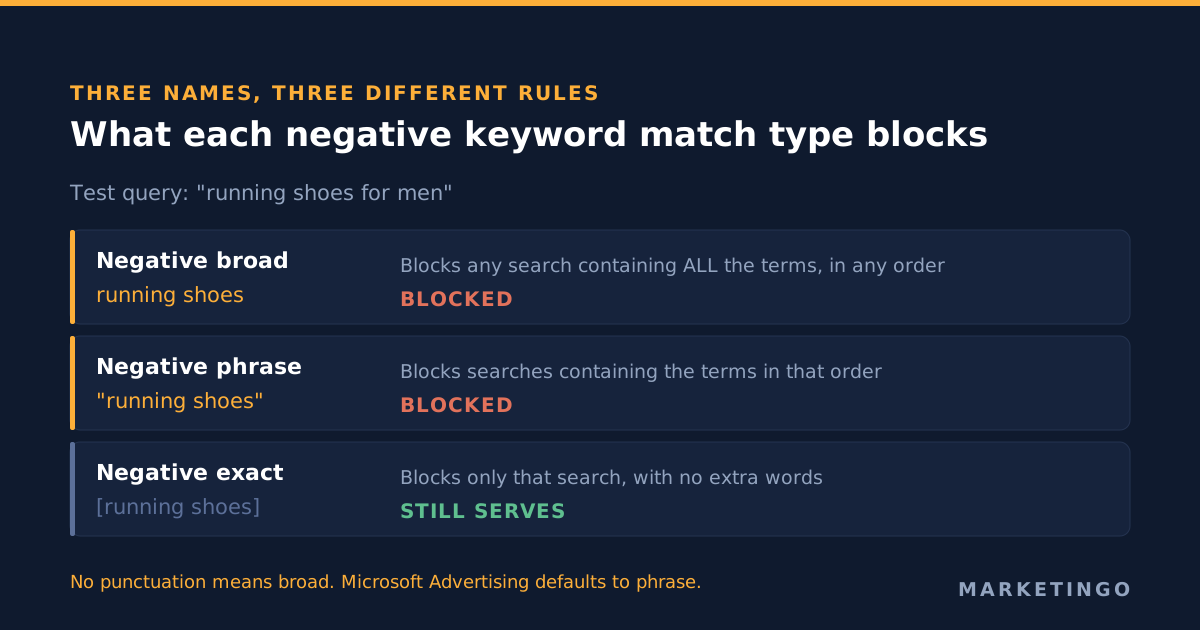
| Negative match type | Syntax | Google's rule | Blocks "running shoes for men" |
|---|---|---|---|
| Negative broad | running shoes | "your ad won't show if the search contains all your negative keyword terms, even if the terms are in a different order" | Yes |
| Negative phrase | "running shoes" | "Your ad won't show if the search contains the exact keyword terms in the same order" | Yes |
| Negative exact | [running shoes] | "Your ad won't show if the search contains the exact keyword terms, in the same order, without extra words" | No |
Two consequences follow, and they run in opposite directions.
A multi-word negative broad is much narrower than it feels. Google requires all of the terms to be present. A negative broad of free shipping does nothing to a search for free returns policy, because only one of the two words appears. Operators who add negative broad terms expecting them to behave like an OR condition end up with exclusions that fire on almost nothing.
A single-word negative broad is much wider than it feels. free as a negative broad removes every search containing the word, which in business-to-business lead generation routinely includes free trial, free consultation and free audit. Those are frequently the highest-intent queries on the account. This is the specific mechanism by which a downloaded negative keyword list quietly removes the traffic you were paying to win.
The default matters too. A negative keyword typed into Google Ads with no punctuation is treated as negative broad. In Microsoft Advertising the default is phrase, which is covered further down because it bites anyone who copies a list across.
Four ways a negative keyword fails without telling you
Each of these is documented by Google. None of them appears in most published guides, which is why accounts keep accumulating exclusions that were never doing the job they were added for.
1. Close variants are not covered. The sentence quoted above is the whole rule, and Google restates it: "Negative keywords do not match to close variants so your ad might still show on searches or pages that contain close variations of your negative keyword terms." Add recruiter and searches for recruiters still serve. The usual advice to "add plurals and misspellings" is correct, and the reason given for it is usually wrong: it is not thoroughness, it is compensating for a matching rule that does not exist on this side of the account.
2. Casing and Google-corrected misspellings are covered, and only those. Google's page says negatives "do account for changes in casing and misspellings for which Google changes the search results." So a typo Google itself auto-corrects in the results page is handled; a typo Google serves as typed is not. The line between the two is not something you can see from inside the account, which is the practical argument for reading the search terms report rather than guessing at variants.
3. Google stops reading at the sixteenth word. Verbatim: "Your ad might still show when someone searches for a phrase that's longer than 16 words, and your negative keyword follows that 16th word." A negative keyword that reliably blocks a five-word query can be bypassed by a long conversational one. As queries lengthen, this gap widens rather than closes, and it is the single least-covered rule in the category.
4. Only four symbols are allowed. Google accepts "ampersands (&), accent marks (á), asterisks (*) and apostrophes (')" in negative keywords. Everything else is stripped or rejected, so an exclusion copied out of a spreadsheet with stray punctuation may not be the exclusion you think you saved.
There is a fifth failure that is a configuration error rather than a matching rule, and Google flags it directly: "Make sure that your negative keywords don't overlap with your regular keywords, because this will cause your ad not to show" (Add negative keywords to campaigns). A conflicting negative sitting above a keyword you are actively bidding on will stop that keyword serving entirely, with no error state loud enough to notice in a weekly check. Google's own diagnostic is honest about its reach too, noting that the test "isn't comprehensive, the keyword may be eligible to serve on additional variants" (Fix issues with negative keywords).
The four levels, and the limit at each
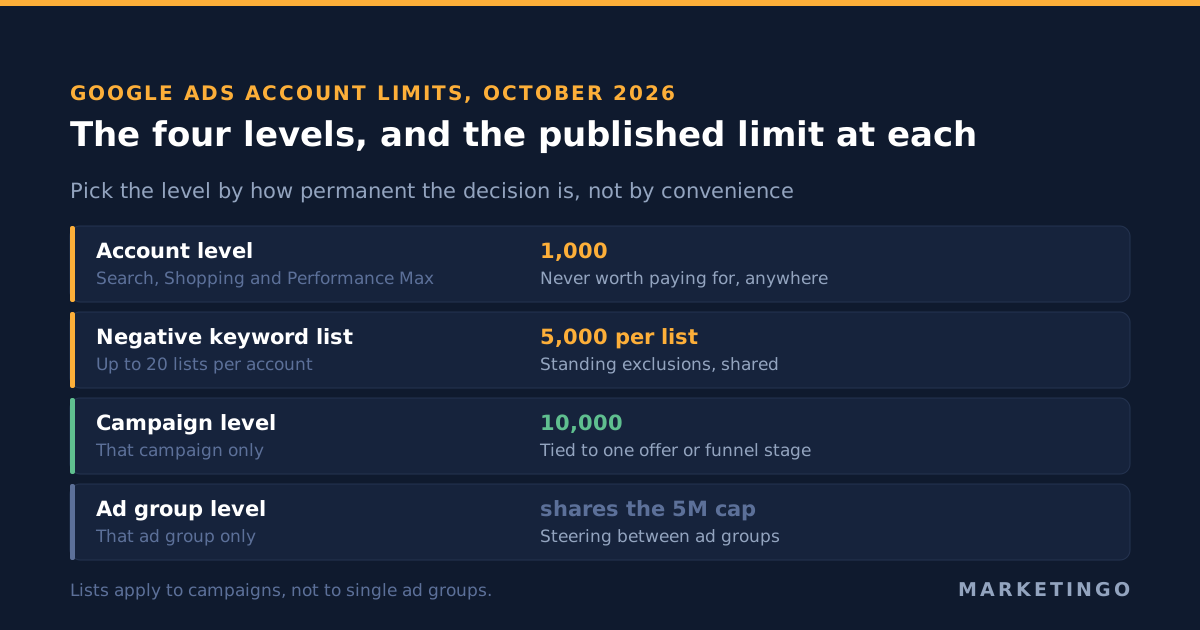
Negative keywords can sit in four places. Most accounts only ever use the campaign or ad group option, and the choice of level is a structural decision rather than a convenience. The limits below are the ones Google currently publishes in Account limits for Google Ads and About account-level negative keywords.
| Level | Current limit | Applies to | Use it for |
|---|---|---|---|
| Ad group | Counts toward 5 million ad group targeting items per account | That ad group only | Steering traffic between ad groups in the same campaign |
| Campaign | 10,000 negative keywords per campaign | That campaign only | Exclusions specific to one offer, geography or funnel stage |
| Negative keyword list | 5,000 keywords per list, 20 lists per account | Any campaigns you apply it to | Standing exclusions shared across the account |
| Account | 1,000 negative keywords | Search, Performance Max, App, Shopping, Smart and Local campaigns | Things nobody in the business ever wants to pay for |
Three details worth holding on to.
Negative keyword lists apply to campaigns, not ad groups. Google's instruction is to "select the campaign that you'd like to apply negative keyword lists to," and the list documentation describes account-level and campaign-level application only. So the shared library cannot do ad-group-level work, and any plan that depends on applying one list to a subset of ad groups needs rebuilding as separate campaigns.
Account-level negative keywords support all three match types (Google: "broad, phrase, or exact match types") and reach search and shopping inventory across six campaign types. Their purpose, in Google's words, is to "exclude search terms from campaigns serving on search and shopping inventory so you can focus only on what matters most to your customers." At a limit of 1,000 they are a policy layer, not a cleanup tool.
Display and Video campaigns play by different rules. The limit there is far lower, "A maximum of 1,000 negative keywords can be applied to Display Network and Video campaigns," and the matching logic is not even the same mechanism: "Keywords are excluded as an exact topic. Ads won't show on a page even if the exact keywords or phrase are not on the page explicitly." A negative keyword on Display is a topical signal about the page, not a string match against a query.
What Google now says about brand negative keywords
Excluding your own brand name with negative keywords has been standard agency advice for a decade. Google's current negative keywords documentation says the opposite, in plain language, and this is the most citable reversal in the category.
On that page, negative keywords used for brand terms are described as "a highly restrictive control that can harm performance by preventing the AI from finding valuable traffic." The recommendation is explicit: "Use brand exclusions instead of negative keywords to avoid paying for clicks on your own brand name," and, more strongly, "It is strongly recommended to use brand exclusions to exclude brand searches instead of negative keywords" (Google Ads Help, About negative keywords).
The mechanical reason is sound, which is why the advice is worth taking rather than arguing with. A brand exclusion is a brand entity, so it covers the brand name plus misspellings and related sub-brands as a unit. A negative keyword list covers the strings you remembered to write down, which, given rule 1 above, is a smaller set than it looks. For anyone running brand and non-brand separately, this changes the implementation and not the intent: you still stop paying for your own name, you just stop doing it with a tool that also suppresses adjacent demand.
This is also the clearest signal of where exclusions are heading. The controls are moving from string matching toward entity and brand-level objects, and the string-matching controls are being described by the platform itself as blunt.
The universal negative keyword list problem
Two of the pages ranking for this topic are downloadable lists of 101 and 1,500 terms. They are popular because they feel like a shortcut, and they are the most reliable way we see accounts lose good traffic.
The argument against them is not taste, it is arithmetic. A generic list is built from single words, because single words are the only thing that generalises across advertisers. Single words in Google Ads become negative broad by default. Negative broad removes every search containing the word. So a list of 500 single words is 500 blunt instruments pointed at an account whose intent profile the list author never saw.
Work through three entries that appear on almost every published list:
freeremovesfree trial,free demoandfree consultation, which in lead generation are bottom-of-funnel queries.cheapremovescheapest way to, which for a cost-reduction product is the buying query.jobsremovesjobs board softwareandjobs api, which for a recruitment technology vendor is the entire category.
None of those is a hypothetical. They are the pattern that shows up when we read a new account's search terms report against its exclusion list in a paid media audit, and the wasted spend usually turns out to be smaller than the suppressed demand.
The defensible version of a standing list is short, account-specific and built from evidence. Terms that are categorically wrong for the business, every time, with no plausible buying intent behind them: competitor names you choose not to bid on, adult and illegal modifiers, student and academic framings for an enterprise product, do-it-yourself framings for a done-for-you service. Twenty to eighty terms, at the account level where they belong, reviewed quarterly. Everything else earns its place from a search term that actually appeared.
Negative keywords in Performance Max and Shopping
Performance Max was launched without campaign-level keyword exclusions and that absence drove most of the early criticism. It no longer holds. Campaign-level negative keywords in Performance Max rose from 100 to 10,000 in March 2025, bringing the campaign type level with Search on this control, and account-level negative keywords explicitly cover Performance Max alongside Search, App, Shopping, Smart and Local.
Read the raised limit for what it is. The increase existed to make a campaign type with no keyword targeting governable, not to invite a 10,000-term wall on a Search campaign. Google's own description of negatives as a restrictive control sits on the same help page as the limits, and both things are true at once: you now have enough room to exclude what you need, and the platform will tell you that over-excluding costs you performance. For the rest of what you can and cannot steer in that campaign type, the Performance Max control surface is the longer version.
Shopping campaigns take negative keywords in the normal way, and they are the main query-level control available there, since you are not bidding keywords at all. The product feed decides what can match; the negatives decide what cannot.
Microsoft Advertising negative keywords behave differently
Anyone running Google and Microsoft side by side copies negative keyword lists across, and the behavior does not survive the trip intact.
Microsoft Advertising documents two negative match types rather than three. Exact: "A match is prevented if all the words in the negative keyword exactly match the user's query." Phrase: "A match is prevented if all the words in the negative keyword are present somewhere in the user's query and are in the same order." There is no negative broad (Microsoft Advertising, Negative Keywords).
More importantly, "Phrase match is the default match type" in Microsoft, where broad is the default in Google. So an unpunctuated list of single words pasted into both platforms produces negative broad in Google and negative phrase in Microsoft. For single words the practical effect is close, because a one-word phrase match and a one-word broad match catch the same thing. For anything multi-word the two platforms now block different sets of queries from the same text file, and the Microsoft side will be the looser of the two.
The list limits match Google's, which makes the mismatch easier to miss: "You can create up to 20 negative keyword lists per account" and "You can add up to 5,000 negative keywords to each negative keyword list." Same numbers, different matching. If you manage both channels, audit the exclusions per platform rather than treating one as a mirror of the other. Our Microsoft Ads management work treats this as a setup step rather than an optimization task, because the drift only ever goes one way.
The system: a search terms routine instead of a bigger list
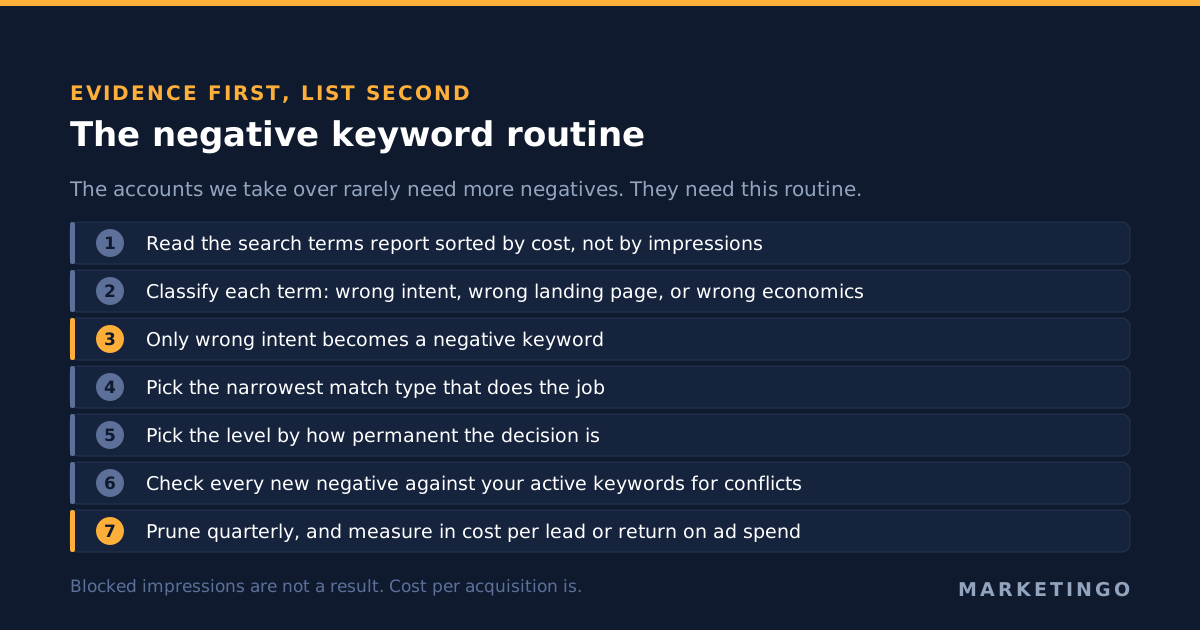
The accounts we take over rarely need more negative keywords. They need a routine that produces the right ones and removes the wrong ones. This is the sequence we run, and it is deliberately boring.
1. Read the search terms report before writing anything. Weekly for accounts spending meaningfully, every two weeks below that. Sort by cost rather than by impressions, because cost is the thing you are trying to reclaim. Note that Google withholds low-volume terms, so the report is a sample of your traffic and not a census of it, which is another reason an evidence-led list stays short.
2. Classify each wasteful term before excluding it. Three buckets, and only one of them is a negative keyword. Wrong intent, which is a negative. Right intent and wrong landing page, which is a landing page or ad group problem. Right intent and wrong economics, which is a bid or target problem and belongs in your bid strategy rather than your exclusions. Excluding a term from bucket three is how accounts shrink.
3. Pick the narrowest match type that does the job. Negative exact for a specific query you never want. Negative phrase for a modifier pattern. A broad match negative only for words that are categorically disqualifying, and never for a word that appears inside any query you want. Reverse the default rather than inheriting it.
4. Pick the level by how permanent the decision is. Permanent and business-wide goes to account level. Shared across several campaigns goes in a named list. Specific to one campaign's offer goes at campaign level. Steering between ad groups goes at ad group level, and nowhere else.
5. Check for conflicts every time you add. Run the new negatives against your active keyword list. Google's warning about overlap is the quietest failure in the account, and it is trivially avoidable with one comparison.
6. Remove exclusions as well as adding them. Every negative keyword is a hypothesis about intent, and hypotheses age. Quarterly, look at the negatives added more than six months ago and ask whether the product, the pricing or the market still justifies them. Nobody does this, which is why accounts calcify.
7. Measure the result in cost per lead or return on ad spend, never in blocked impressions. A negative keyword programme that reduced impressions by 40% and left cost per acquisition flat accomplished nothing except making the account smaller. The number that matters is the one the business reads, and you can model what a change in wasted spend does to it with the lead generation calculator or, for retail, the ecommerce return on ad spend calculator.
When a negative keyword is the wrong tool
There are four situations where it is a mistake to use negative keywords at all, because the exclusion makes the account worse and something else is the actual fix.
The query is relevant and the page is not. A search for a product you sell that lands on a generic category page converts badly. Excluding the query removes revenue; building the page captures it.
The query converts, at a cost you do not like. That is an economics problem. Targets, bids and margin decide it, and break-even return on ad spend is where that number comes from, not the exclusion list.
The traffic is your own brand. Covered above. Brand exclusions, per Google's own strong recommendation, rather than negative keywords.
The volume of junk is overwhelming on a broad match keyword. Negatives applied one at a time will never catch up with a broad match keyword on a wide theme. The structural fix is the keyword and the match type, and exclusions are the finishing pass afterwards.
What this looks like when it is run properly
Negative keyword work is unglamorous and it compounds. The discipline is a short evidence-led list, the narrowest match type that does the job, the right level for how permanent the decision is, and a quarterly prune. The outcome shows up in the metrics the business already watches rather than in a count of blocked searches.
It also rarely travels alone. Exclusions, conversion tracking and bid strategy are one system, because a negative keyword changes what the bidding model learns from. For a worked example of the whole surface, our Google Ads audit checklist covers the order to inspect an account in, and the Google Ads conversion tracking piece covers the measurement layer that decides whether any of it is readable.
Two places this has mattered recently. In our business-to-business software case study, restructuring query control alongside the tracking layer took cost per trial from $64 to $27 while trial signups roughly tripled, and Microsoft Ads was added afterwards as a second high-intent channel. In the large-catalogue retail case study, the account was spending 37% of its budget on products that produced no revenue at all, which is the retail version of the same problem: the budget was reaching queries the business had no reason to buy.
If you want to know what your own search terms report is funding, that is what a free paid media audit looks at first. We run Google Ads management for business-to-business lead generation and for retail, and for high-ticket business-to-business services in particular the suppressed-demand side of a bad exclusion list usually costs more than the wasted spend does.